
🛒 Where to Buy
⚠️ Golden Rule of Retro Handhelds: Throw away the cheap MicroSD card that comes in the box — it will fail. And never use a high-wattage PD “Fast Charger” on these devices; it can damage the battery. Use a standard 5V/1.5A brick.
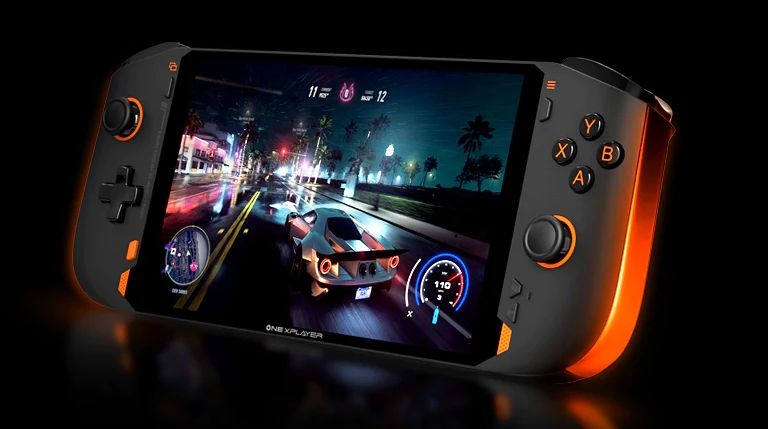
Device Overview: One Netbook One XPlayer Mini Pro
The One Netbook One XPlayer Mini Pro is not a low-power ARM emulation box in the mould of an Anbernic or a Miyoo. It is a full x86 Windows 11 gaming PC crammed into a 7-inch handheld shell, built by One-Netbook and launched in November 2022 as a direct rival to Valve’s Steam Deck. The headline part is the AMD Ryzen 7 6800U: eight Zen 3+ cores, sixteen threads, boosting to 4.7 GHz, paired with an integrated Radeon 680M (12 RDNA 2 compute units at 2.2 GHz). That means it runs the same Windows executables as your desktop, so “emulation” here is a subset of what it does rather than its whole reason to exist. It shipped from $1,199 with 16 GB of LPDDR5-6400 and a 512 GB PCIe 3.0 NVMe SSD, climbing to roughly $1,549 for a 32 GB / 2 TB configuration. That price puts it in a completely different bracket from the $80-$150 retro crowd, and it should be judged as a premium PC handheld, not a ROM machine.
Emulation performance, generation by generation
Because the 680M is a genuine RDNA 2 GPU, the emulation ceiling is high and the bottleneck is CPU single-thread performance and per-emulator maturity, not raw grunt. Everything through the sixth generation runs at full speed with upscaling to spare: PS1 (DuckStation), N64 (simple64/RMG), Dreamcast (Flycast), PSP (PPSSPP) and Saturn all run at 2x-4x internal resolution without breaking a sweat. GameCube and Wii on Dolphin are comfortable, typically at 2x-3x native with the Vulkan backend. PS2 via PCSX2 is where the 6800U earns its keep: most of the library runs well at 2x-3x, though a handful of the heaviest titles still need per-game tuning. The seventh generation is the realistic frontier. Wii U on Cemu is strong. Switch emulation on Ryujinx runs many titles at or near full speed, but expect stutter and per-game fiddling on the demanding ones, and note the legal and availability turbulence around Switch emulators since 2024. PS3 on RPCS3 is hit-and-miss and leans heavily on the CPU. Treat that generation as “playable with effort,” not “flawless.”
Screen, build and controls
The 7-inch IPS panel runs 1920×1200 (16:10, 323 ppi) at 60 Hz, covers 100% sRGB and peaks around 350 nits. It is sharp and colour-accurate but locked to 60 Hz, so there is no high-refresh headroom the way newer One-Netbook models offer. The chassis is plastic, measures 260 x 106 x 23 mm and weighs 599 g, which is lighter than a Steam Deck but still a two-handed device. Controls are the strong suit: asymmetric offset analog sticks using Hall-effect sensors, which resist the stick drift that plagues potentiometer designs and let you run near-zero deadzones. You get analog triggers with generous travel, stacked shoulder buttons, a bottom-mounted d-pad, gyro and a 10-point touchscreen. Two USB4 Type-C ports (Thunderbolt-class, eGPU-capable), a USB 3.0 Type-A port, a microSD slot, a 3.5 mm jack, Wi-Fi 6 and Bluetooth 5 round it out. The 48 Wh (12,450 mAh) battery is the honest weak point: at full 28 W TDP in a demanding game you are looking at roughly 1.5-2 hours, so this is a plugged-in or short-session machine unless you cap the TDP.
Software and setup
It ships with Windows 11, which is a blessing and a curse. The blessing: no compatibility layer, direct access to Steam, Epic, Game Pass, RetroArch and every standalone emulator, plus a real desktop for organising ROMs and firmware. The curse: Windows was never designed for a 7-inch touchscreen and a gamepad, so out of the box you will be poking at tiny UI elements. The community answer is a front-end. EmuDeck now has a Windows installer that provisions emulators, RetroArch cores and an EmulationStation-DE front-end automatically; Playnite gives you a couch-friendly unified library; and Handheld Companion or the bundled OneXConsole utility let you remap controls and manage TDP. There is no muOS, Knulli, ArkOS or ROCKNIX story here because those are Linux images for ARM boards, but nothing stops an adventurous owner from installing Bazzite or SteamOS-style Linux to get a console-like shell. Budget an afternoon for setup regardless of route.
Price, value and who it is for
At $1,199 and up, the Mini Pro is a hard sell purely as an emulator, because a $200 device handles everything up to Dreamcast and the leap to native PS2 and GameCube does not need a machine this expensive. Its real value is that it plays your Steam library and your entire emulation stack on one device, with Hall sticks and a lovely high-res screen. It made most sense to buyers in 2022 who wanted a Steam Deck alternative with a sharper 1200p display and drift-proof sticks, and who could live with mediocre battery life and a steeper price. Today, with the newer OneXPlayer X1 and cheaper Ryzen Z1-based rivals available, it is best bought used and discounted. Recommended for the PC-handheld enthusiast who values the screen and controls; skip it if you only want a pocketable retro player.
📐 Size & Pocketability
⚖️ Weight vs Other Handhelds
🔋 Real-World Battery Estimator
⭐ Emulation Performance
📊 View How This Score is Calculated
The Hardware Power Score is an absolute metric. Perfect emulation of difficult, modern consoles awards significantly more points than standard retro consoles.
- 15× Multiplier: Modern PC
- 12× Multiplier: Switch, PS3, Xbox 360
- 10× Multiplier: Wii U
- 8× Multiplier: PS2, GameCube, Wii, Xbox
- 5× Multiplier: Saturn, Dreamcast, PSP
- 3× Multiplier: N64, PS1
- 1× Multiplier: SNES, GBA
Gen 8 & PC
Generation 7
Generation 6
Generation 5
Handhelds & Retro
⚡ Performance Benchmarks
Where One Netbook One XPlayer Mini Pro AMD Radeon 680M lands against the handhelds everyone knows. Every bar shares one scale, so longer genuinely means faster — add up to two rivals to compare.
CPU = Geekbench 6 multi-core · GPU = 3DMark Wild Life. Median real-world scores; every bar shares one scale — add up to two rivals to compare.
📋 Full Specifications
📺 Display
⚙️ Platform
💾 Memory
🕹️ Controls
📏 Body
🔋 Battery
⚖️ Verdict
✅ The Good
- Full x86 Windows 11 PC: runs native Steam games plus every emulator, not just ROMs
- Ryzen 7 6800U with Radeon 680M comfortably handles GameCube, Wii and most PS2, with Switch playable
- Hall-effect analog sticks resist drift and allow near-zero deadzones
- Sharp 1920×1200 IPS screen with 100% sRGB, plus dual USB4/Thunderbolt ports for eGPUs
❌ The Bad
- 48 Wh battery gives only about 1.5-2 hours under a full-power gaming load
- $1,199+ launch price is very high, especially versus dedicated ARM retro handhelds
- Windows 11 is clumsy on a 7-inch touchscreen and needs a front-end to feel console-like
📰 Latest News & Guides
The Ultimate Guide to ARMSX3: Android’s New PS3 Emulator, Competitor Comparisons, and Setup Tutorial
18/08/2026Pokémon Gold, Silver, and Crystal (Gen 2) Recomp Lands on Android
17/08/2026How to Play the Pokémon Red, Blue, or Yellow Recomp on Your Android, Windows, and Linux Devices
16/08/2026🔍 Similar Handhelds
Other handhelds that emulate up to CURRENTGEN.