
🛒 Where to Buy
💸 Best deal seen: USD 799
⚠️ Golden Rule of Retro Handhelds: Throw away the cheap MicroSD card that comes in the box — it will fail. And never use a high-wattage PD “Fast Charger” on these devices; it can damage the battery. Use a standard 5V/1.5A brick.
Device Overview: AOKZOE A1 Pro
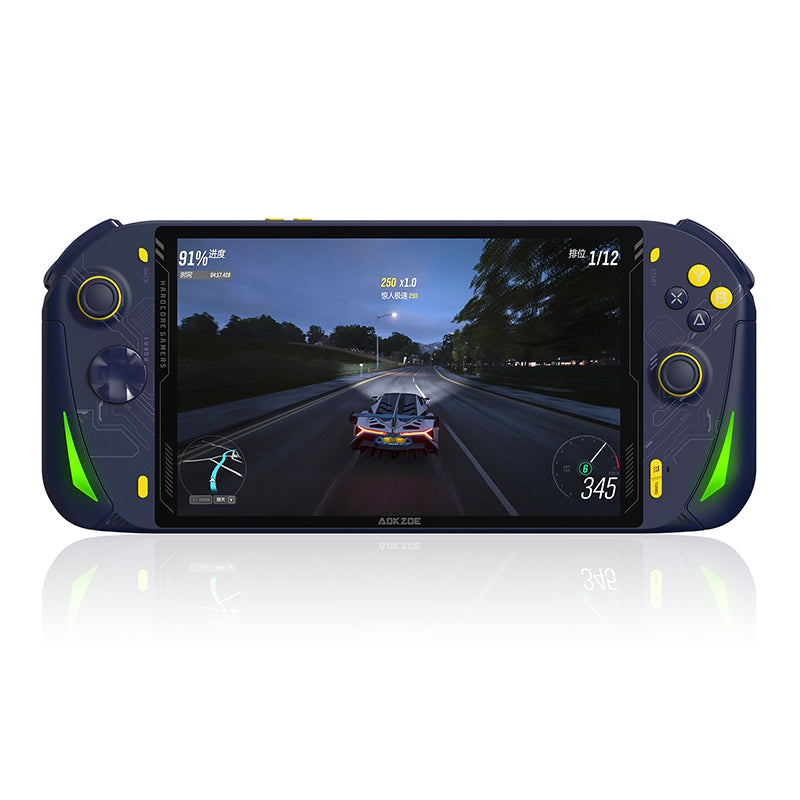
The AOKZOE A1 Pro is what happens when a manufacturer decides the 7-inch consensus was a mistake. It takes the AMD Ryzen 7 7840U (Zen 4 cores, RDNA 3 Radeon 780M graphics) that powers most of the 2023 enthusiast handheld class and bolts it to an 8-inch, 1920×1200 IPS panel and a 65Wh battery. The result is a slab: 285mm wide, 729g on the scale, closer to a small tablet with grips than to a Steam Deck. AOKZOE is one of the One-Netbook spin-off brands, and the A1 Pro reads exactly like that lineage; competent silicon, generous internals, less polish on the parts your thumbs actually touch. It lands directly between the AYANEO 2S (same chip, smaller and prettier, more expensive) and the GPD Win Max 2 (clamshell, keyboard, productivity-first). Against the ROG Ally it trades Asus’s lighter body and 120Hz screen for a bigger display and a far less restrictive docked experience.
Emulation performance, generation by generation
The 7840U is a strong emulation chip, and the A1 Pro has the thermal envelope to hold its clocks. PlayStation 2 (PCSX2), GameCube and Wii (Dolphin) run effortlessly here, internal-resolution upscaling included; this hardware is overkill for that tier. Switch emulation on Ryujinx or the surviving Yuzu forks runs well once shader caches are built, which is the standard Windows caveat. PS3 via RPCS3 is realistic rather than universal: lighter titles like Tekken 6 and WipEout HD play cleanly with the occasional frame drop, while the heavier first-party games still demand patience and per-game tuning. Wii U through Cemu is comfortable. Xbox 360 on Xenia remains the rough edge it is on every handheld, no exceptions; expect a working list of compatible games and a longer list of crashes and audio glitches, and treat anything that runs as a bonus. The big-screen advantage is real for emulation specifically: 8 inches of 1200p gives upscaled retro output room to breathe in a way 7-inch panels do not.
Screen, build and controls
The 8-inch panel is the entire pitch. It’s a 1920×1200 IPS display, 283 PPI, 100% sRGB, with 10-point touch and roughly 350 nits of brightness. It is a 60Hz panel, not the 120Hz you get on a ROG Ally, and the 350-nit ceiling means bright rooms will wash it out; this is an indoor screen. But for couch sessions and emulation it looks genuinely grand, and the extra real estate is the reason to buy this device over anything smaller. The trade-off is mass. At 729g and 285mm wide, the A1 Pro is a two-handed, lap-or-table device; it is not going in a jacket pocket and your wrists will notice during long standing sessions. Build quality is fine but plain, with a built-in kickstand. The controls are where the budget shows: asymmetric analog sticks that feel a step below the AYANEO and GPD competition, analog triggers, and a 6-axis gyro. These are conventional analog sticks, not Hall-effect, so factor in long-term drift. Aftermarket thumb grips are a common and worthwhile fix.
Software and setup
This is a Windows 11 machine, with everything that implies. You get Steam, Game Pass, Epic, GOG and every emulator that runs on a PC, and you also get the Windows tax: driver updates, the occasional fight to keep the screen in landscape, and a desktop OS that was never designed for thumbsticks. AOKZOE’s answer is OneXConsole, the OneXPlayer-family utility that handles TDP adjustment, fan curves, RGB and an automatic-TDP mode; it works but is no match for the Steam Deck’s integrated layer. Most owners install a front-end such as Playnite to unify their libraries, plus RetroArch or standalone emulators for retro work, and lean on the touchscreen and gyro to navigate Windows itself. Budget an afternoon for setup. None of this is unique to the A1 Pro, but anyone cross-shopping a Steam Deck should understand they are buying a small PC, not an appliance.
Price, value and who it’s for
The A1 Pro launched at $799 for the entry 32GB/512GB configuration as an early-bird price, with the 32GB/1TB at $859, 32GB/2TB at $959, and the loaded 64GB/2TB at $1,159; standard retail was set higher, around $999 for the base unit. That’s the same ballpark as the AYANEO 2S and undercuts the GPD Win Max 2, while asking considerably more than a ROG Ally. The value case rests almost entirely on the screen and battery: you are paying for 8 inches of 1200p and 65Wh, and against same-chip rivals that’s a fair trade. Connectivity helps too, with dual USB4-capable USB-C, USB-A 3.0, a 3.5mm jack and microSD, plus a 65W charger (100W-capable) for fast top-ups; note there’s no OCuLink on this model, that arrived on the later A1 X. Buy it if you want the largest comfortable screen on a 7840U handheld and you game seated or docked. Skip it if portability, pocketability or twitchy outdoor sessions matter, or if you want premium Hall sticks and a high-refresh panel out of the box. It’s a big-screen specialist, and it’s honest about it.
📐 Size & Pocketability
⚖️ Weight vs Other Handhelds
🔋 Real-World Battery Estimator
⭐ Emulation Performance
📊 View How This Score is Calculated
The Hardware Power Score is an absolute metric. Perfect emulation of difficult, modern consoles awards significantly more points than standard retro consoles.
- 15× Multiplier: Modern PC
- 12× Multiplier: Switch, PS3, Xbox 360
- 10× Multiplier: Wii U
- 8× Multiplier: PS2, GameCube, Wii, Xbox
- 5× Multiplier: Saturn, Dreamcast, PSP
- 3× Multiplier: N64, PS1
- 1× Multiplier: SNES, GBA
Gen 8 & PC
Generation 7
Generation 6
Generation 5
Handhelds & Retro
⚡ Performance Benchmarks
Where AOKZOE A1 PRO AMD Radeon 780M lands against the handhelds everyone knows. Every bar shares one scale, so longer genuinely means faster — add up to two rivals to compare.
CPU = Geekbench 6 multi-core · GPU = 3DMark Wild Life. Median real-world scores; every bar shares one scale — add up to two rivals to compare.
📋 Full Specifications
📺 Display
⚙️ Platform
💾 Memory
🕹️ Controls
📏 Body
🔋 Battery
⚖️ Verdict
✅ The Good
- Big 8-inch 1920×1200 IPS screen with 100% sRGB and 10-point touch, ideal for upscaled emulation
- Large 65Wh battery plus 65W (100W-capable) GaN charging for fast top-ups
- Strong Ryzen 7 7840U / Radeon 780M silicon with enough thermal headroom to hold clocks
- Generous, expandable internals: up to 64GB LPDDR5X, up to 2TB PCIe 4.0 NVMe, dual USB4-capable USB-C plus USB-A and microSD
❌ The Bad
- Heavy and wide at 729g / 285mm, a two-handed lap-or-table device with no real portability
- Conventional analog sticks (not Hall-effect) that feel a tier below same-priced rivals and risk drift
- 60Hz, ~350-nit panel that gets washed out outdoors and trails the ROG Ally's 120Hz display
📰 Latest News & Guides
The Ultimate Guide to ARMSX3: Android’s New PS3 Emulator, Competitor Comparisons, and Setup Tutorial
18/08/2026Pokémon Gold, Silver, and Crystal (Gen 2) Recomp Lands on Android
17/08/2026How to Play the Pokémon Red, Blue, or Yellow Recomp on Your Android, Windows, and Linux Devices
16/08/2026🔍 Similar Handhelds
Other handhelds that emulate up to CURRENTGEN.