
🛒 Where to Buy
⚠️ Golden Rule of Retro Handhelds: Throw away the cheap MicroSD card that comes in the box — it will fail. And never use a high-wattage PD “Fast Charger” on these devices; it can damage the battery. Use a standard 5V/1.5A brick.
Device Overview: AYANEO Flip KB
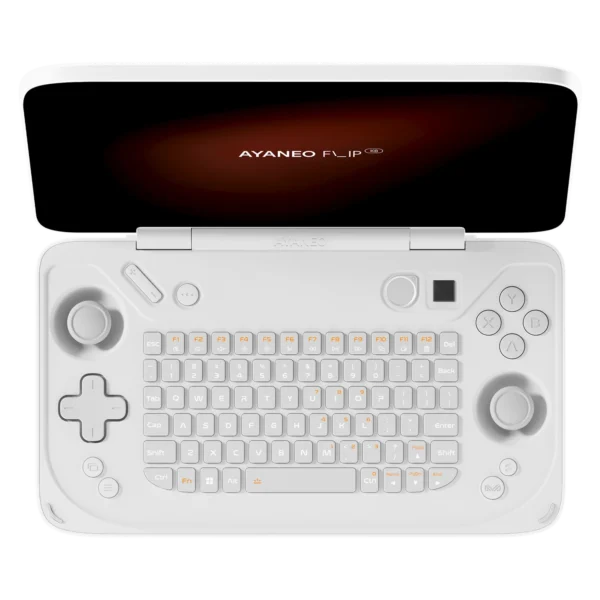
The AYANEO Flip KB is a clamshell Windows gaming PC that borrows the Nintendo DS silhouette and then does something no DS ever tried: it puts a backlit QWERTY keyboard where the second screen would go. It is the sibling of the Flip DS, which keeps the dual-touchscreen layout; the KB trades that lower panel for physical keys, an optical finger-mouse nub, and the ability to fold shut like a tiny laptop. Underneath the retro cosplay sits a thoroughly modern x86 machine, AMD Zen 4 silicon, Windows 11 and an OCuLink port for an external GPU, so this is not a Linux emulation box in the mold of an Anbernic or Miyoo. It emulates as well as it does precisely because it is a full PC.
Emulation performance, generation by generation
The Flip KB pairs a Radeon 780M iGPU with either a Ryzen 7 7840U (the launch flagship) or a Ryzen 7 8840U, two near-identical Zen 4 parts that differ mainly in NPU clocks, so its emulation ceiling is high. Everything through the sixth console generation is trivial: NES, SNES, Genesis, PS1, N64, Dreamcast and PSP all run at full speed in RetroArch with upscaling and shaders to spare. GameCube and Wii through Dolphin are effortless, most of that library holding a locked frame rate at 2x to 3x internal resolution. PS2 via PCSX2 is comfortable, though the heaviest 3D titles reward per-game tuning. The interesting tier is seventh-gen and later: Wii U in Cemu runs Breath of the Wild playably, PS3 in RPCS3 clears a good chunk of its catalogue if you accept compromises, and Switch emulation through the surviving Ryujinx forks is genuinely usable at 30 to 60 fps depending on the game. This is not magic. The roughly 30W power envelope and small 45Wh battery mean demanding emulation drains the pack fast and spins the fan up, but the raw capability is real, and OCuLink lets you dock to an eGPU when you want desktop-class output.
Screen, build and controls
The main panel is a 7-inch 1080p IPS touchscreen running at 120Hz, glossy, officially rated near 400 nits but measured meaningfully brighter in review testing. At 368 PPI it is sharp, covers close to full sRGB, and the high refresh makes lighter games and the Windows desktop feel fluid. The folded shell weighs about 650g and measures 180 x 108 x 37.5mm, chunkier than a 3DS and closer to a pocket netbook. Controls are the standout: Hall-effect analog sticks and Hall-effect analog triggers that resist drift, a real d-pad, ABXY, shoulder buttons with a haptic motor, and replaceable magnetic grips. The mini keyboard is RGB-backlit with a function row but no numpad, and being thumb-width it suits chat, terminal commands and search bars far better than sustained writing; reviewers noted you essentially need a flat surface to touch-type on it. An optical finger-mouse nub covers cursor duty for the moments Windows insists on a pointer.
Software and setup
Being a Windows machine cuts both ways. Out of the box the AYANEO Flip KB boots Windows 11 Home with AYANEO’s AYASpace launcher layered on top for TDP control, fan curves, key mapping and a controller-friendly front end. Windows on a 7-inch screen is still fiddly, and the usual handheld chores apply: tame the sleep behaviour, tune the power profiles, and lean on the touchscreen or finger-mouse for anything the sticks cannot reach. For emulation most owners install EmuDeck on Windows, or RetroBat and LaunchBox, to corral cores and scrapers into one big-picture interface. If you resent the Windows overhead you can wipe it for Bazzite or Batocera and run the thing as a SteamOS-style console. The muOS, Knulli and ROCKNIX custom-firmware ecosystem that defines cheap ARM handhelds simply does not apply here, because this is x86 hardware. The keyboard genuinely earns its keep during setup, since typing Wi-Fi passwords, editing config files and driving a package manager is far less painful than on a keyboard-less rival.
Price, value and who it is for
The AYANEO Flip KB is expensive. Early-bird pricing opened at $699 for the 16GB/512GB Ryzen 7 7840U model and climbed past $1,200 for a 64GB/2TB build, with standard retail higher still. You are paying a heavy premium for the novel folding form factor, not for performance you could not get cheaper in a slab handheld like an ASUS ROG Ally or AYANEO’s own bar-shaped models. Battery life is the real weakness: expect little more than an hour of serious gaming from the 45Wh cell, and the upper-left corner gets warm and audible under load. Buy the AYANEO Flip KB if the clamshell-with-keyboard concept genuinely speaks to you, whether that is DS nostalgia, a device you can snap shut and drop in a bag, or the ability to SSH and type a message without summoning an on-screen keyboard. If your only metric is frames per dollar, look elsewhere.
📐 Size & Pocketability
⚖️ Weight vs Other Handhelds
🔋 Real-World Battery Estimator
⭐ Emulation Performance
📊 View How This Score is Calculated
The Hardware Power Score is an absolute metric. Perfect emulation of difficult, modern consoles awards significantly more points than standard retro consoles.
- 15× Multiplier: Modern PC
- 12× Multiplier: Switch, PS3, Xbox 360
- 10× Multiplier: Wii U
- 8× Multiplier: PS2, GameCube, Wii, Xbox
- 5× Multiplier: Saturn, Dreamcast, PSP
- 3× Multiplier: N64, PS1
- 1× Multiplier: SNES, GBA
Gen 8 & PC
Generation 7
Generation 6
Generation 5
Handhelds & Retro
⚡ Performance Benchmarks
Where AYANEO Flip KB Radeon 780M lands against the handhelds everyone knows. Every bar shares one scale, so longer genuinely means faster — add up to two rivals to compare.
CPU = Geekbench 6 multi-core · GPU = 3DMark Wild Life. Median real-world scores; every bar shares one scale — add up to two rivals to compare.
📋 Full Specifications
📺 Display
⚙️ Platform
💾 Memory
🕹️ Controls
📏 Body
🔋 Battery
⚖️ Verdict
✅ The Good
- Hall-effect analog sticks and Hall-effect triggers resist the stick drift that plagues cheaper handhelds
- Radeon 780M plus a Zen 4 CPU emulates cleanly through GameCube, Wii and PS2 and pushes into Switch, PS3 and Wii U territory
- Genuinely useful folding clamshell with a backlit QWERTY keyboard for chat, config edits and terminal work
- OCuLink and 40Gbps USB4 allow docking to an external GPU for desktop-class output
❌ The Bad
- Weak battery: the 45Wh cell manages barely over an hour of demanding gaming, and the device runs hot and loud under load
- Very expensive, starting around $699 early-bird and topping $1,200, a steep premium over more powerful slab handhelds
- The thumb-width keyboard is cramped and really needs a flat surface for real typing, undercutting its headline feature
📰 Latest News & Guides
The Ultimate Guide to ARMSX3: Android’s New PS3 Emulator, Competitor Comparisons, and Setup Tutorial
18/08/2026Pokémon Gold, Silver, and Crystal (Gen 2) Recomp Lands on Android
17/08/2026How to Play the Pokémon Red, Blue, or Yellow Recomp on Your Android, Windows, and Linux Devices
16/08/2026🔍 Similar Handhelds
Other handhelds that emulate up to CURRENTGEN.