
🛒 Where to Buy
⚠️ Golden Rule of Retro Handhelds: Throw away the cheap MicroSD card that comes in the box — it will fail. And never use a high-wattage PD “Fast Charger” on these devices; it can damage the battery. Use a standard 5V/1.5A brick.
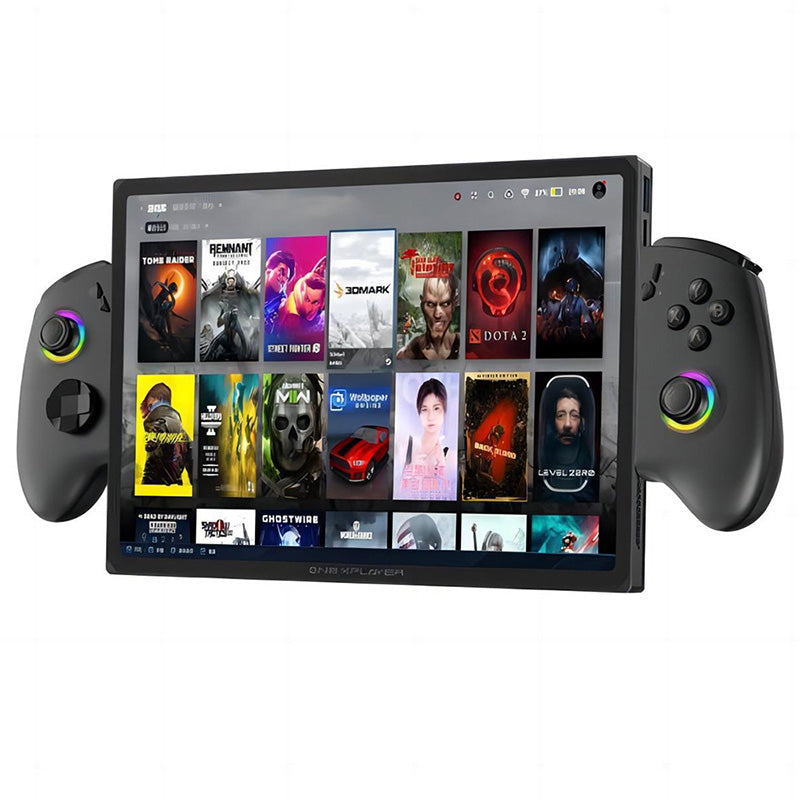
Device Overview: One Netbook OneXPlayer X1 Pro
The One Netbook OneXPlayer X1 Pro is not a pocketable emulation toy but a 10.95-inch Windows 11 tablet that clamps into detachable Xbox-style controllers and, with the optional keyboard cover, folds into a small laptop. It is built around AMD’s Ryzen AI 9 HX 370, the same Strix Point silicon that shows up in premium ultrabooks, so filing it under “retro handheld” undersells what it is. This is a full x86 PC that happens to have joysticks bolted to its sides, and for emulation that single fact matters more than any other line on the spec sheet.
Emulation performance, generation by generation
Because it runs desktop Windows on a 12-core Zen 5 chip with a Radeon 890M iGPU, the X1 Pro sits at the very top of the emulation ladder. Everything through the sixth generation is trivial: NES, SNES, Genesis, PlayStation, N64, Dreamcast and PSP all run at full speed with upscaling and shaders to spare through RetroArch, DuckStation, Flycast and PPSSPP. GameCube and Wii under Dolphin are effortless at 3x or 4x internal resolution. The interesting territory is seventh and eighth gen. PS3 via RPCS3 and Wii U via Cemu are genuinely playable here, though the heaviest PS3 titles still stutter the way they do on any current handheld — this is a strong iGPU, not magic. Switch emulation through the Ryujinx forks and Sudachi runs many first-party games well, with the usual shader-compilation hitches on first launch. Even shadPS4 for early PlayStation 4 titles is worth experimenting with, something no ARM handheld can claim. The ceiling is set by the 890M and the 30W sustained TDP rather than by the emulator, which is exactly the position you want to be in.
Screen, build and controls
The 10.95-inch IPS panel is the headline: 2560×1600 at 120 Hz, glossy, 10-point multitouch, and PWM-free so it will not flicker at low brightness. It is sharp at roughly 276 PPI, covers a wide 138% sRGB gamut, and stays smooth, but it is only middling in brightness at about 385 nits average, so a sunny room will fight you. At 253 x 164 x 15 mm and around 780 g for the tablet alone — close to 1.2 kg once both controllers are attached — this is a two-handed, sit-down device, nearer to an iPad Pro with grips than to a Steam Deck. The controllers use Hall-effect analog sticks and Hall-based linear triggers, so stick drift should not be a worry, and they add an 8-way d-pad, two rear paddles and the full Xbox button layout. Buttons feel clean and clicky, and the fan whines faintly under load without ever getting loud. A 65 Wh battery keeps it fed, but at a 28-30W gaming load expect closer to two hours; the bundled 100 W GaN charger refills it quickly. Ports are generous: two USB4 (40 Gbps), one 20 Gbps USB 3.2 Gen 2×2, a microSD reader, a 3.5 mm jack, Bluetooth 5.2, and an OCuLink connector for an external GPU. Storage is a user-accessible M.2 2280 PCIe 4.0 SSD reading around 7 GB/s, so upgrades and swaps are straightforward.
Software and setup
This ships with Windows 11 Home, which is both the blessing and the curse. You get Steam, Game Pass, GOG, every emulator and every launcher at once, but you also inherit Windows’ clumsy touch targets and the chore of tuning TDP and fan curves through OneXPlayer’s own utility. For emulation specifically, EmuDeck’s Windows installer will scaffold the major emulators and a Steam ROM Manager layout for you, while a Playnite front-end makes the whole library controller-navigable from the couch. If you would rather have a console-style shell, you can dual-boot Batocera or Bazzite, both of which run on this x86 hardware, at the cost of your Windows game library in that mode. Worth noting: the wireless is the older Intel AX210 (Wi-Fi 6E, not Wi-Fi 7), which is perfectly usable but a slightly dated choice at this price.
Price, value and who it is for
Pricing starts around $1,399 and climbs fast through the 64 GB RAM and up to 4 TB SSD configurations, before you add the keyboard, the kickstand, or the OneXGPU dock the OCuLink port enables. That is laptop-and-tablet money, and it only adds up if you will genuinely use all three modes. As a pure emulation box it is wildly overpowered and overpriced — a Steam Deck OLED or a good ARM handheld does retro far more cheaply. But if you want one machine that emulates cleanly up to PS3, Wii U and Switch, plays modern Steam games at 800p to 1080p, doubles as a real 2.5K tablet, and can drive a desktop GPU over OCuLink, the X1 Pro is one of very few devices that credibly does all of it. Buy it for that versatility, not for retro alone.
📐 Size & Pocketability
⚖️ Weight vs Other Handhelds
🔋 Real-World Battery Estimator
⭐ Emulation Performance
📊 View How This Score is Calculated
The Hardware Power Score is an absolute metric. Perfect emulation of difficult, modern consoles awards significantly more points than standard retro consoles.
- 15× Multiplier: Modern PC
- 12× Multiplier: Switch, PS3, Xbox 360
- 10× Multiplier: Wii U
- 8× Multiplier: PS2, GameCube, Wii, Xbox
- 5× Multiplier: Saturn, Dreamcast, PSP
- 3× Multiplier: N64, PS1
- 1× Multiplier: SNES, GBA
Gen 8 & PC
Generation 7
Generation 6
Generation 5
Handhelds & Retro
⚡ Performance Benchmarks
Where One Netbook OneXPlayer X1 Pro AMD Radeon 890M lands against the handhelds everyone knows. Every bar shares one scale, so longer genuinely means faster — add up to two rivals to compare.
CPU = Geekbench 6 multi-core · GPU = 3DMark Wild Life. Median real-world scores; every bar shares one scale — add up to two rivals to compare.
📋 Full Specifications
📺 Display
⚙️ Platform
💾 Memory
🕹️ Controls
📏 Body
🔋 Battery
⚖️ Verdict
✅ The Good
- Top-tier emulation ceiling: full-speed through PS3, Wii U and Switch on a Zen 5 / Radeon 890M x86 platform
- Genuine 3-in-1 versatility as handheld, 2.5K tablet and laptop, plus OCuLink for an external GPU
- Excellent 10.95-inch 2560×1600 120 Hz PWM-free IPS display with 10-point touch
- Hall-effect sticks and linear triggers, rear paddles and clicky buttons that resist drift and wear
❌ The Bad
- Very expensive, starting around $1,399 and rising sharply with RAM and storage tiers
- Large and heavy (~1.2 kg with controllers) with only ~2 hours of real gaming battery life at 30W
- Overkill and overpriced if you only want retro emulation, where cheaper handhelds suffice; Wi-Fi is the older 6E AX210
📰 Latest News & Guides
The Ultimate Guide to ARMSX3: Android’s New PS3 Emulator, Competitor Comparisons, and Setup Tutorial
18/08/2026Pokémon Gold, Silver, and Crystal (Gen 2) Recomp Lands on Android
17/08/2026How to Play the Pokémon Red, Blue, or Yellow Recomp on Your Android, Windows, and Linux Devices
16/08/2026🔍 Similar Handhelds
Other handhelds that emulate up to CURRENTGEN.