
🛒 Where to Buy
⚠️ Golden Rule of Retro Handhelds: Throw away the cheap MicroSD card that comes in the box — it will fail. And never use a high-wattage PD “Fast Charger” on these devices; it can damage the battery. Use a standard 5V/1.5A brick.
Device Overview: One Netbook OneXPlayer G1
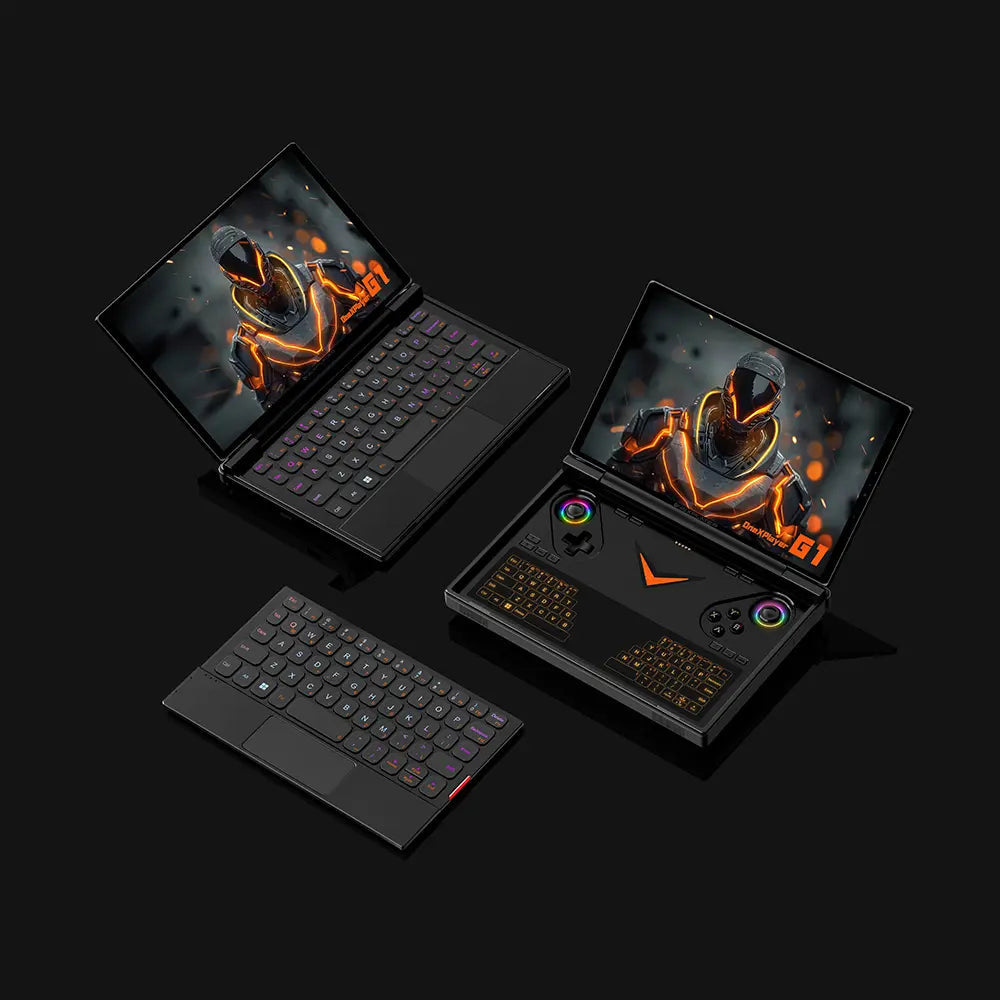
The One Netbook OneXPlayer G1 is not a pocket emulator in the Anbernic or Miyoo mold. It is a full x86 Windows 11 machine that happens to mold gamepad grips onto an 8.8-inch tablet and clip a magnetic RGB keyboard to its base. One Netbook pitches it as three devices in one: a Switch-style handheld, a mini-laptop, and, through its OCuLink port, a docked desktop when paired with an external GPU. Emulation here is a byproduct of laptop-grade horsepower rather than the design brief, and that framing shapes every judgment below.
Emulation performance, generation by generation
Because the G1 runs the same Radeon and Intel Arc silicon you would find in a Steam Deck rival, its emulation ceiling is the desktop ceiling, not the ARM one. On the flagship Ryzen AI 9 HX 370 (12-core Zen 5/5c, Radeon 890M, RDNA 3.5, 16 compute units), everything through the PS2, GameCube and Wii era is trivial. PCSX2 and Dolphin hold full speed while upscaling internal resolution to 3x or 4x. Wii U via Cemu and PSP via PPSSPP are effortless. The interesting tier is the demanding one. RPCS3 runs a large slice of the PS3 library at or near full speed, with the usual per-game asterisks around SPU-heavy titles. Switch emulation, now living on Ryujinx forks and Citron or Sudachi builds since Yuzu’s shutdown, is genuinely playable, though shader-compilation stutter and driver quirks still bite. The base Ryzen 7 8840U (Zen 4, Radeon 780M) gives up roughly 15 to 20 percent of that headroom; it still crushes PS2 and Wii but grows choosier about heavy PS3 and Switch games. The Intel Core Ultra 7 255H option sits in similar territory with Arc graphics, though its handheld emulator support is less battle-tested than AMD’s. Below all of that, the lighter systems are a formality: melonDS handles DS, Citra forks cover the 3DS, Vita3K takes on early PS Vita titles, and DuckStation runs PS1 flawlessly. None of this is emulator-firmware wizardry. It is a laptop APU with a fan, and the wattage you feed it, not the software, sets the limit.
Screen, build and controls
The panel is an 8.8-inch LTPS LCD at 2560×1600, 144Hz, with touch and roughly 500 nits. It is sharp and fast, but it is still LCD, so black levels will not match the OLED that OneXPlayer ships on its own X1 line. The gamepad is molded into the tablet: analog sticks the retail listing describes as Hall-sensor, a d-pad, face and shoulder buttons, Hall triggers, and rear buttons. The party trick is the detachable side. Pop off the 142g magnetic keyboard and the G1 is a chunky handheld; snap it back on and it becomes a mini-laptop with a small RGB backlit keyboard. A capacitive thumb-typing strip below the screen handles two-handed text entry, though DROIX’s reviewer found it more gimmick than tool. At 880g for the tablet alone, and 1.2 inches thick, it is heavy in the hands, noticeably more so than a Steam Deck. Connectivity is generous for the class: Wi-Fi 6E, Bluetooth 5.2, twin USB-C ports with USB4, a USB 3.2 Type-A jack, a 3.5mm headphone port, and the OCuLink connector for eGPU docks. A 100W GaN charger and the 51.97Wh battery round it out. Cooling leans on a copper heat pipe and a fan that reviewers measured near 67dB at full tilt, so headphones are not optional under load.
Software and setup
This is where the G1 parts ways with everything muOS, Knulli, ArkOS or ROCKNIX touches. Those firmwares are built for ARM Linux handhelds and are simply irrelevant here. The G1 boots Windows 11, so the emulation stack is the desktop one: standalone RetroArch, Dolphin, PCSX2, DuckStation, RPCS3, Cemu, PPSSPP, melonDS and a Switch emulator of your choosing. The practical route is EmuDeck for Windows, which installs and pre-configures those cores and drops you into an ES-DE or Playnite front end so you are not alt-tabbing across apps on a gamepad. Batocera and ChimeraOS will boot on the x86 hardware too if you would rather leave Windows behind entirely. The cost is Windows itself: driver updates, TDP-tuning utilities and the usual handheld-Windows friction that a locked-down retro OS spares you.
Price, value and who it is for
The G1 launched through Indiegogo near $899 for the Ryzen 7 8840U with 32GB and a 1TB SSD, climbing past $1,500 for the HX 370 with 64GB and 4TB; the official store hovers around $1,399 to $1,549. That is not retro-handheld money. It is gaming-laptop money, because the G1 is a gaming laptop that folds into a controller. If your goal is Game Boy Advance and PS1 on the couch, this is absurd overkill, and a Retroid Pocket or Miyoo will serve you better for a fraction of the outlay. The G1 earns its keep only if you also want native PC gaming, PS3 and Switch-class emulation, the OCuLink eGPU path, and a real keyboard for work, and are willing to babysit Windows and a heavy-load battery that drains toward an hour to get all of it. Judged as an emulation box alone it makes no sense; judged as a convertible PC that also emulates almost anything, it is coherent.
📐 Size & Pocketability
⚖️ Weight vs Other Handhelds
🔋 Real-World Battery Estimator
⭐ Emulation Performance
📊 View How This Score is Calculated
The Hardware Power Score is an absolute metric. Perfect emulation of difficult, modern consoles awards significantly more points than standard retro consoles.
- 15× Multiplier: Modern PC
- 12× Multiplier: Switch, PS3, Xbox 360
- 10× Multiplier: Wii U
- 8× Multiplier: PS2, GameCube, Wii, Xbox
- 5× Multiplier: Saturn, Dreamcast, PSP
- 3× Multiplier: N64, PS1
- 1× Multiplier: SNES, GBA
Gen 8 & PC
Generation 7
Generation 6
Generation 5
Handhelds & Retro
⚡ Performance Benchmarks
Where One Netbook OneXPlayer G1 AMD Radeon 890M lands against the handhelds everyone knows. Every bar shares one scale, so longer genuinely means faster — add up to two rivals to compare.
CPU = Geekbench 6 multi-core · GPU = 3DMark Wild Life. Median real-world scores; every bar shares one scale — add up to two rivals to compare.
📋 Full Specifications
📺 Display
⚙️ Platform
💾 Memory
🕹️ Controls
📏 Body
🔋 Battery
⚖️ Verdict
✅ The Good
- Desktop-class emulation ceiling: the Radeon 890M/780M APU runs PCSX2, Dolphin, Cemu and much of RPCS3 and Switch at full speed, far beyond any ARM handheld
- Genuinely convertible form factor with a built-in gamepad, a detachable RGB keyboard for laptop mode, and OCuLink for an external GPU when docked
- Sharp, fast 8.8-inch 2560×1600 144Hz LTPS touchscreen at around 500 nits
- Runs full Windows 11, so it plays native PC games and doubles as a productivity machine rather than just an emulator
❌ The Bad
- Heavy and thick (880g tablet, roughly 1kg with keyboard, 1.2 inches deep), and heavy-load battery life collapses toward an hour despite the 51.97Wh cell
- Laptop-tier pricing ($899 to over $1,500) makes it wildly overkill for anyone who only wants retro and PS1-era emulation
- Windows-handheld friction: none of the polished retro firmwares (muOS, ArkOS, ROCKNIX) apply, so you manage drivers, TDP tuning and front ends yourself
📰 Latest News & Guides
The Ultimate Guide to ARMSX3: Android’s New PS3 Emulator, Competitor Comparisons, and Setup Tutorial
18/08/2026Pokémon Gold, Silver, and Crystal (Gen 2) Recomp Lands on Android
17/08/2026How to Play the Pokémon Red, Blue, or Yellow Recomp on Your Android, Windows, and Linux Devices
16/08/2026🔍 Similar Handhelds
Other handhelds that emulate up to CURRENTGEN.