
🛒 Where to Buy
⚠️ Golden Rule of Retro Handhelds: Throw away the cheap MicroSD card that comes in the box — it will fail. And never use a high-wattage PD “Fast Charger” on these devices; it can damage the battery. Use a standard 5V/1.5A brick.
Device Overview: Game Kiddy GKD Pixel
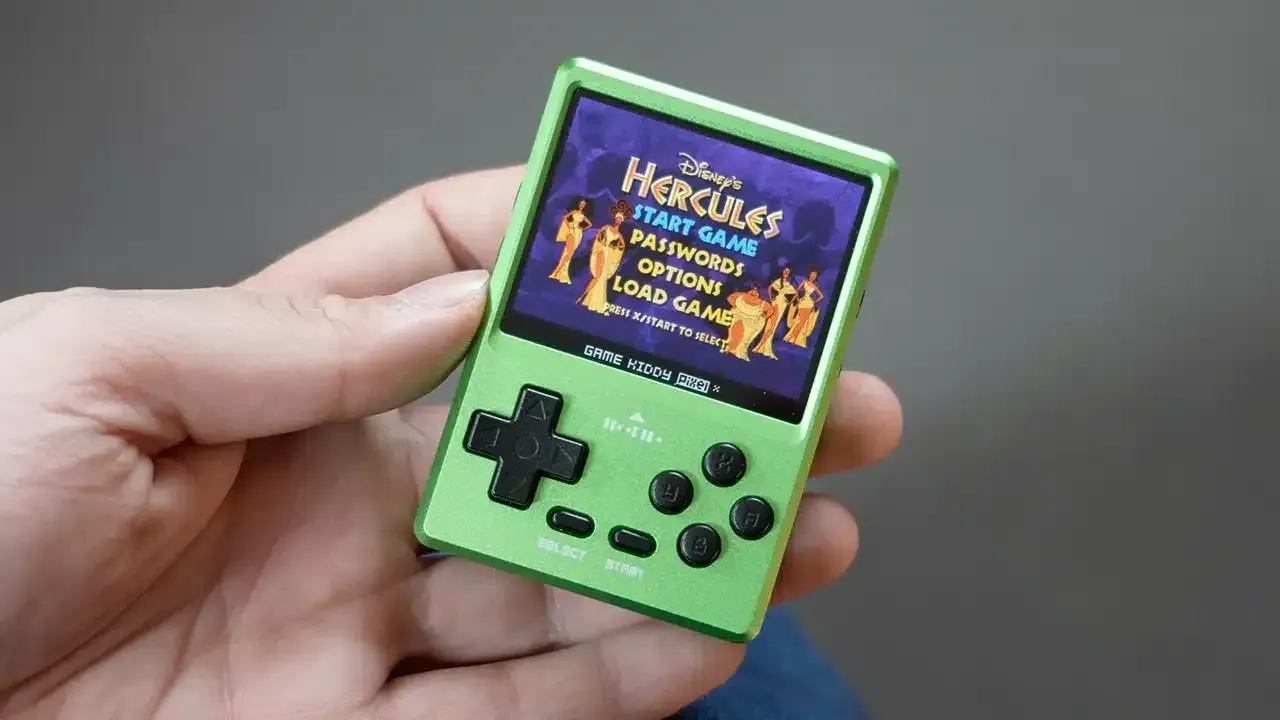
The Game Kiddy GKD Pixel is a wallet-sized aluminium handheld that launched in January 2024 at roughly $90, and it exists for one specific buyer: someone who wants the smallest metal-bodied retro machine they can get with a true 4:3 screen. At 80 x 56 x 18 mm and 107 grams it is barely larger than a Miyoo Mini, but the unibody shell gives it a density and heft that plastic rivals cannot match. This is a low-power MIPS device, not a pocket PC, and understanding that is the whole story of what it can and cannot do.
Emulation performance, generation by generation
The Pixel runs an Ingenic X1830, a MIPS XBurst SoC clocked around 1.5 GHz and paired with just 128 MB of DDR2 RAM. That silicon puts it firmly in 8- and 16-bit territory with a slice of early 32-bit on top. Game Boy, Game Boy Color, NES and Master System run at full speed through gambatte, FCEUmm and Genesis Plus GX with room to spare. Mega Drive and SNES are comfortable: snes9x clears the bulk of the SNES library at full frame rate, though the heaviest SuperFX and SA-1 games such as Star Fox, Yoshi’s Island and Super Mario RPG will occasionally stutter. GBA is mostly full speed on mGBA, and the most demanding titles can fall back to gpSP with its speed hacks. PlayStation 1 is the genuine ceiling here. PCSX ReARMed, running a software renderer because the X1830 has no meaningful 3D GPU, holds full frame rates on Ridge Racer Type 4 and Tekken 3, but heavier 3D like Gran Turismo 2 will dip and on a 2.4-inch screen the menu text becomes a squint. N64, Saturn, Dreamcast and PSP are simply not on the table; the chip and the 128 MB of RAM are nowhere near it, and no amount of tinkering changes that.
Screen, build and controls
The 2.4-inch IPS panel is 320 x 240 at 60 Hz, and at roughly 173 pixels per inch it looks crisp for its size. The native 4:3 shape is the reason to buy this thing: SNES, PS1 and arcade games fill the glass without stretching, and Game Boy titles integer-scale cleanly. Dark scenes show some minor backlight bleed around the edges, but colour and brightness are strong. The aluminium shell feels genuinely premium and protective. The d-pad is the standout control, tight and clicky with good travel, which suits the platformers and fighters this device is built for. The rest is a mixed bag: the face buttons are small with too much flex and a slightly mushy action, and the four shoulder buttons are stacked side by side with L2 and R2 stiff and awkward to reach. There are no analog sticks at all, which is a non-issue for 2D but does hobble the PS1 3D games that expect one. The single mono speaker turns tinny above roughly 60 to 70 percent volume, so the 3.5 mm jack earns its keep.
Software and setup
Out of the box the Pixel boots a custom Linux stock interface that is clunky and was locked down at launch, with emulators awkwardly split between a standalone folder and a RetroArch folder whose performance did not always match. The community fix, and the way most owners actually use this device, is MinUI. Shaun Inman’s minimalist frontend supports the Pixel and delivers what the stock OS does not: instant sleep and resume, clean box-art navigation, per-system emulator mapping and no menus to fight. RetroGameCorps publishes a MinUI add-on package that folds the stock standalone emulators and extra libretro cores, including arcade, MAME and Neo Geo, back into MinUI’s navigation. Note what is absent from the conversation: ROCKNIX, Knulli, muOS, ArkOS and Batocera are all built for ARM chips like the RK3326 and its cousins, so none of them run here. The Ingenic MIPS platform leaves you with the stock OS or MinUI, and MinUI is the obvious pick. There is no WiFi and no Bluetooth, so every ROM transfer means physically pulling the microSD card, which is a chore but also keeps the device pleasantly distraction-free.
Price, value and who it is for
At around $90, occasionally dipping toward $76 on sale, the Pixel sits alongside the Miyoo Mini Plus and Anbernic’s RG35XX line. What you are paying for is the machined metal body and that true 4:3 IPS panel; what you give up is WiFi, Bluetooth, a larger screen and analog sticks. The 1300 mAh battery charges over USB-C and returns three to four hours, which is modest but fair for the size. Buy the GKD Pixel if you want the smallest premium-feeling machine for Game Boy through SNES with light PS1 on the side, and you are happy to flash MinUI on day one. Skip it if you need N64, PSP or Dreamcast, want netplay or wireless audio, or expect a device that is great straight out of the box without any tinkering.
📐 Size & Pocketability
⚖️ Weight vs Other Handhelds
🔋 Real-World Battery Estimator
⭐ Emulation Performance
📊 View How This Score is Calculated
The Hardware Power Score is an absolute metric. Perfect emulation of difficult, modern consoles awards significantly more points than standard retro consoles.
- 15× Multiplier: Modern PC
- 12× Multiplier: Switch, PS3, Xbox 360
- 10× Multiplier: Wii U
- 8× Multiplier: PS2, GameCube, Wii, Xbox
- 5× Multiplier: Saturn, Dreamcast, PSP
- 3× Multiplier: N64, PS1
- 1× Multiplier: SNES, GBA
Generation 5
Handhelds & Retro
📋 Full Specifications
📺 Display
⚙️ Platform
💾 Memory
🕹️ Controls
📏 Body
🔋 Battery
⚖️ Verdict
✅ The Good
- Genuinely pocketable machined-aluminium unibody (80 x 56 x 18 mm, 107 g) that feels far more premium than plastic rivals in its size class
- Sharp native 4:3 IPS panel (320 x 240, 60 Hz, ~173 PPI) that shows SNES, PS1 and arcade games without stretching
- Excellent tight, clicky d-pad with good travel that suits 2D platformers and fighters
- Full MinUI support, plus a RetroGameCorps add-on pack, turns the clunky stock OS into instant sleep/resume, clean navigation and added arcade cores
❌ The Bad
- The Ingenic X1830 with only 128 MB of RAM caps out at PS1; N64, Saturn, Dreamcast and PSP are off the table
- No WiFi and no Bluetooth at all, so every ROM transfer means pulling the microSD card and there is no wireless audio
- Small, mushy face buttons, stiff L2/R2 shoulders and a tinny mono speaker undercut the otherwise premium shell
📰 Latest News & Guides
The Ultimate Guide to ARMSX3: Android’s New PS3 Emulator, Competitor Comparisons, and Setup Tutorial
18/08/2026Pokémon Gold, Silver, and Crystal (Gen 2) Recomp Lands on Android
17/08/2026How to Play the Pokémon Red, Blue, or Yellow Recomp on Your Android, Windows, and Linux Devices
16/08/2026🔍 Similar Handhelds
Other handhelds that emulate up to PS1.