
🛒 Where to Buy
⚠️ Golden Rule of Retro Handhelds: Throw away the cheap MicroSD card that comes in the box — it will fail. And never use a high-wattage PD “Fast Charger” on these devices; it can damage the battery. Use a standard 5V/1.5A brick.
Device Overview: AYANEO Kun
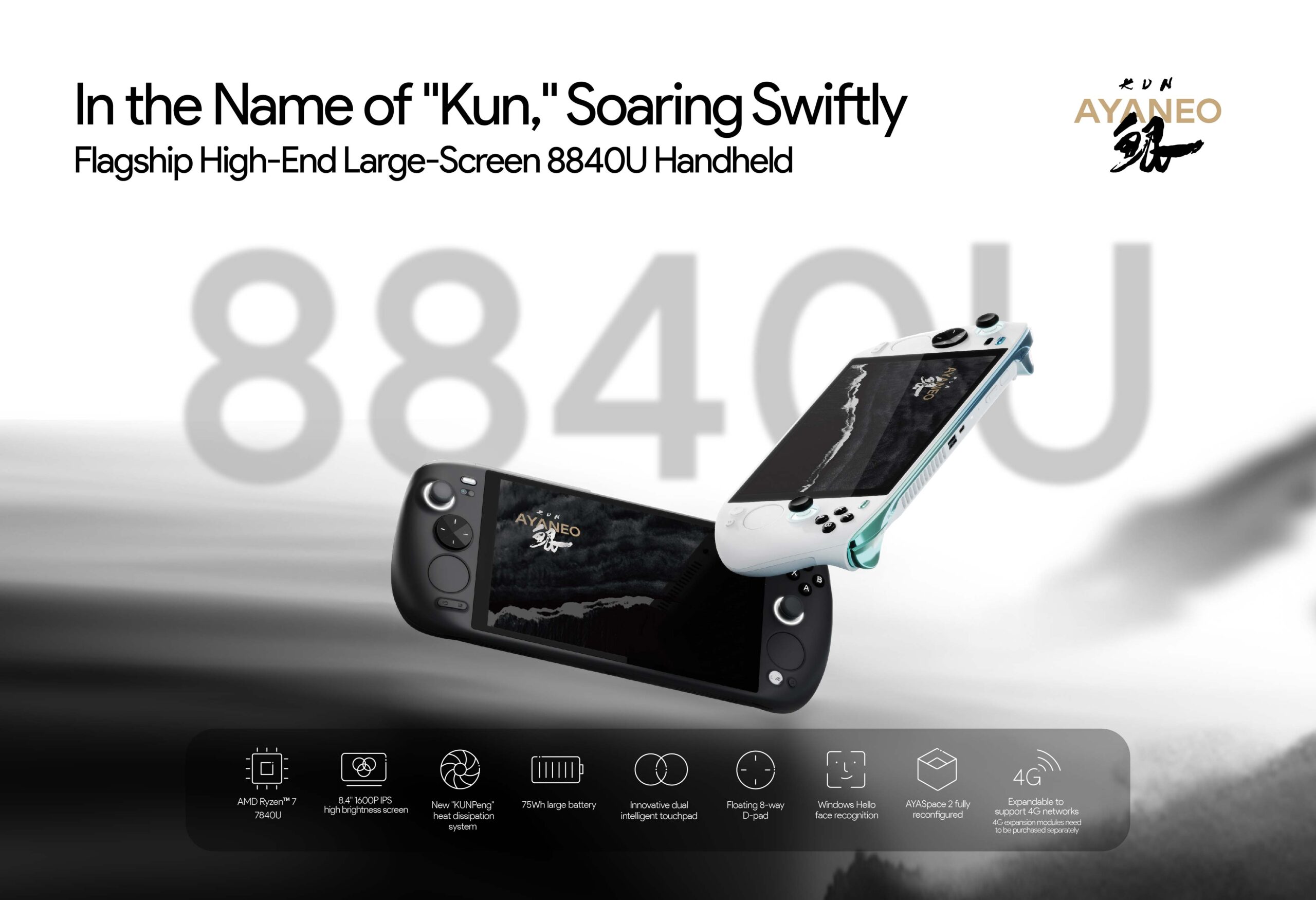
The AYANEO Kun is the company’s “go big” handheld, and it means it literally. At roughly 942 grams and a footprint that’s closer to a small tablet than a Steam Deck, this is the largest device AYANEO ships, built around an 8.4-inch 2560×1600 IPS panel and a 75Wh battery that dwarfs almost everything else on the market. The version most people buy today runs AMD’s Ryzen 7 8840U, the Zen 4 refresh of the 7840U the Kun originally launched with, paired with the same Radeon 780M integrated graphics. It starts around $999 for the 16GB/512GB configuration and climbs steeply as you add LPDDR5 memory (up to 64GB) and NVMe storage (up to 4TB).
Positioning matters here. The Kun is not trying to be the device you slip into a coat pocket on a commute. Its natural rival is the AOKZOE A1 Pro, another oversized 8.4-inch 8840U handheld with a similarly enormous battery, and to a lesser extent the Lenovo Legion Go, which shares the 8.8-inch big-screen philosophy and detachable controllers but undercuts the Kun on price. Against those, the Kun’s pitch is the battery and the trackpad-equipped, gyro-laden control deck. You are paying for endurance and a giant sharp screen, not for portability.
Emulation performance, generation by generation
The 8840U and its Radeon 780M are a known emulation quantity, and the extra TDP headroom (up to 54W) gives the Kun room to push harder than smaller handhelds. PlayStation 2, GameCube, and Wii are effectively a solved problem here: PCSX2, Dolphin, and the rest run those libraries at full speed with internal resolution upscaled to 3x or 4x, and the 2.5K panel is the right canvas for that detail to actually show. Switch emulation on Ryujinx or the Yuzu forks is realistic but title-dependent, the heavy first-party games still demand tuning and the occasional dropped frame, while Wii U via Cemu is generally smoother. PS3 through RPCS3 is the honest middle ground: many games are playable with patches and per-title config, but it is not plug-and-play. Xbox 360 via Xenia remains rough and experimental regardless of the silicon. Where the big screen earns its keep is upscaling, those crisp PS2 and GameCube renders look genuinely good at 1600p rather than stretched.
Screen, build and controls
The 8.4-inch IPS display is the headline. It is sharp, bright (AYANEO advertises a high-brightness panel and reviewers measured well past 500 nits), and covers roughly 90% DCI-P3, so colors pop. The catch is the refresh rate: this is a 60Hz panel, not a high-refresh screen, so you will want V-sync enabled in most games to avoid tearing, and twitchy genres won’t feel as fluid as they would on a 120Hz handheld. The 75Wh battery is the other standout, nearly double a Steam Deck’s, which translates to real multi-hour sessions even at aggressive wattages. Build quality is premium and the control layout is dense: Hall-effect sticks and triggers, dual six-axis gyros, four back buttons, and two trackpads for desktop navigation and mouse-driven games. All of that comes at the cost of heft, the Kun is a two-handed couch device, and your wrists will know it after a long session.
Software and setup
This is a Windows handheld, which means it ships with the full desktop OS and AYANEO’s AYASpace launcher layered on top to wrangle TDP profiles, button mapping, fan curves, and library aggregation. AYASpace has improved but still has the rough edges typical of vendor handheld software, expect to spend setup time tuning per-game wattage and dealing with the occasional driver or update quirk. You also pay the “Windows tax” in full: storage overhead, background updates, and a touch-and-trackpad-driven desktop that is workable thanks to those trackpads but never as frictionless as a console UI. SteamOS this is not.
Price, value and who it’s for
At $999 to start and well over $1,300 for higher memory and storage tiers, the Kun is a luxury purchase, and AYANEO knows it. The value case rests almost entirely on two things you can’t easily get elsewhere: the 75Wh battery and the large, color-accurate 2.5K screen. If you primarily play at home, run a lot of emulation, and want a handheld that lasts through a flight or a long evening without a charger, the Kun delivers exactly that. If you want a pocketable device, twitch-shooter-grade 120Hz fluidity, or the lowest price per frame, look at a smaller 7-inch handheld or the discounted Legion Go instead. The Kun is a deliberate, big-and-heavy specialist, not an all-rounder.
📐 Size & Pocketability
⚖️ Weight vs Other Handhelds
🔋 Real-World Battery Estimator
⭐ Emulation Performance
📊 View How This Score is Calculated
The Hardware Power Score is an absolute metric. Perfect emulation of difficult, modern consoles awards significantly more points than standard retro consoles.
- 15× Multiplier: Modern PC
- 12× Multiplier: Switch, PS3, Xbox 360
- 10× Multiplier: Wii U
- 8× Multiplier: PS2, GameCube, Wii, Xbox
- 5× Multiplier: Saturn, Dreamcast, PSP
- 3× Multiplier: N64, PS1
- 1× Multiplier: SNES, GBA
Gen 8 & PC
Generation 7
Generation 6
Generation 5
Handhelds & Retro
⚡ Performance Benchmarks
Where AYANEO Kun AMD Radeon 780M lands against the handhelds everyone knows. Every bar shares one scale, so longer genuinely means faster — add up to two rivals to compare.
CPU = Geekbench 6 multi-core · GPU = 3DMark Wild Life. Median real-world scores; every bar shares one scale — add up to two rivals to compare.
📋 Full Specifications
📺 Display
⚙️ Platform
💾 Memory
🕹️ Controls
📏 Body
🔋 Battery
⚖️ Verdict
✅ The Good
- Enormous 75Wh battery delivers genuinely long play sessions, roughly double a Steam Deck
- Large, sharp 8.4-inch 2560×1600 IPS panel with ~90% DCI-P3 makes upscaled emulation look excellent
- Ryzen 7 8840U with up to 54W TDP headroom handles PS2/GameCube/Wii effortlessly and Switch/Wii U realistically
- Rich control deck: Hall-effect sticks and triggers, dual trackpads, four back buttons, and gyro
❌ The Bad
- 60Hz display, not the 120Hz the size and price might lead you to expect, so V-sync is often mandatory
- Heavy (~942g) and tablet-sized, this is a home/couch device, not a portable one
- Premium pricing ($999 entry, well over $1,300 loaded) plus the usual Windows + AYASpace software friction
📰 Latest News & Guides
The Ultimate Guide to ARMSX3: Android’s New PS3 Emulator, Competitor Comparisons, and Setup Tutorial
18/08/2026Pokémon Gold, Silver, and Crystal (Gen 2) Recomp Lands on Android
17/08/2026How to Play the Pokémon Red, Blue, or Yellow Recomp on Your Android, Windows, and Linux Devices
16/08/2026🔍 Similar Handhelds
Other handhelds that emulate up to CURRENTGEN.