
🛒 Where to Buy
⚠️ Golden Rule of Retro Handhelds: Throw away the cheap MicroSD card that comes in the box — it will fail. And never use a high-wattage PD “Fast Charger” on these devices; it can damage the battery. Use a standard 5V/1.5A brick.
Device Overview: AYANEO Slide
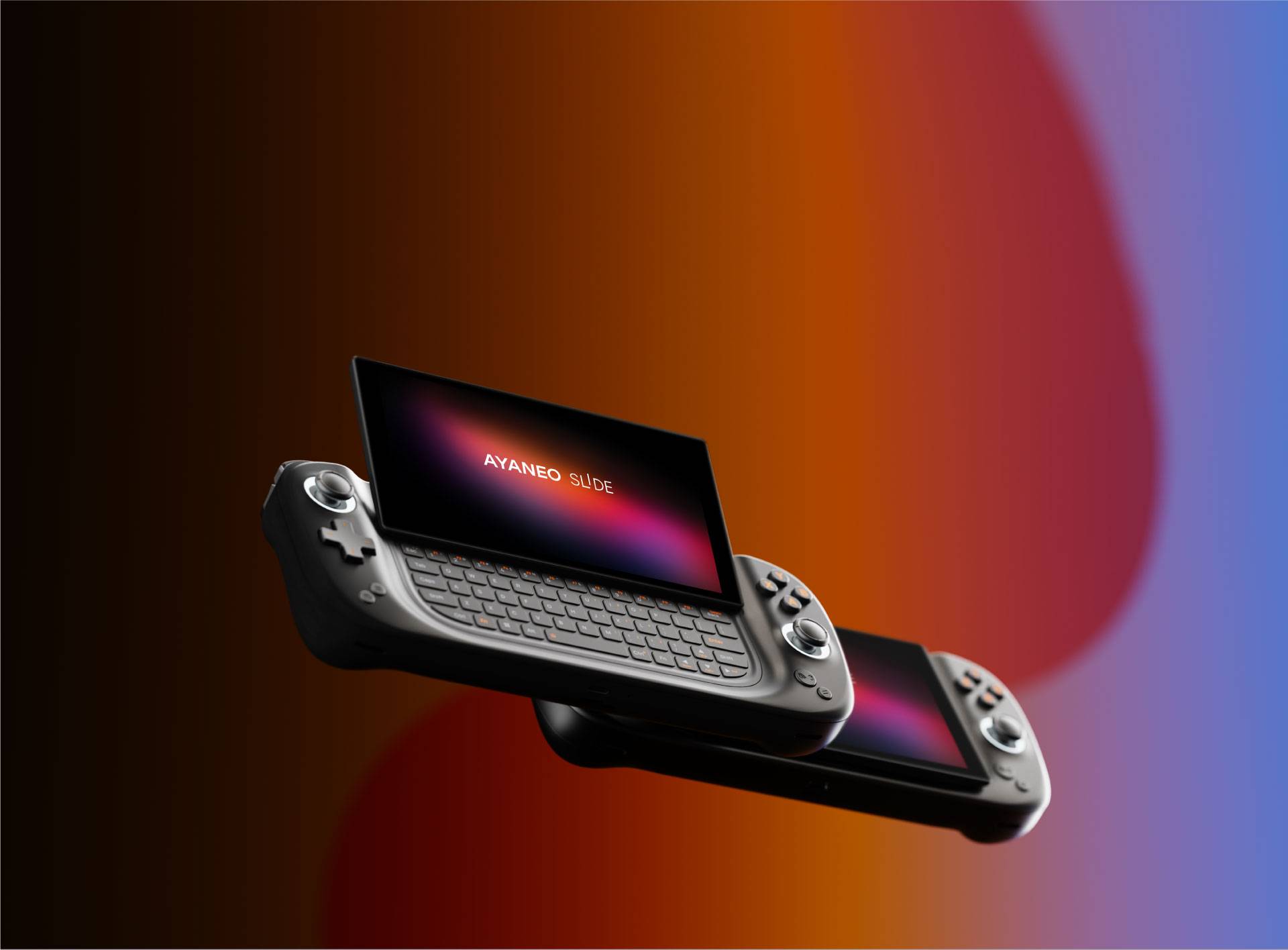
The AYANEO Slide is a Windows x86 gaming handheld with a party trick no rival matched at launch: the 6-inch screen slides up on a spring-loaded hinge and tilts to a 10-to-30-degree angle, exposing a full backlit QWERTY keyboard underneath. It runs an AMD Ryzen 7 7840U (eight Zen 4 cores, sixteen threads) with a Radeon 780M iGPU on RDNA 3, the same silicon that powered the ASUS ROG Ally and the Lenovo Legion Go in this generation. So this is not a low-power ARM emulation box like an Anbernic or a Retroid; it is a pocket PC, and its emulation ceiling is set by how much sustained wattage that APU can pull, not by a fixed chip class. AYANEO priced it from $699 on Indiegogo with an $899 MSRP, and the keyboard is the whole reason it exists.
Emulation performance, generation by generation
Because this is a full x86 Windows machine, emulation reaches far higher than any handheld running RetroArch on ARM. Everything through the sixth console generation is trivial. PS2 (PCSX2), GameCube and Wii (Dolphin), and PSP (PPSSPP) all run at internal-resolution upscales without breaking a sweat. The interesting territory is the seventh and eighth generations. Nintendo Switch emulation on Ryujinx or the surviving Yuzu forks runs the bulk of the library at or near full speed, sometimes with shader-compilation stutter on first play. Wii U via Cemu is strong. PS3 through RPCS3 is the honest ceiling: many first-party titles are playable, but heavier games still dip, and you are managing per-game configs rather than dropping in a ROM and going. The 7840U is not magic here, it is the same class of chip as a Steam Deck’s, just clocked higher, and the 28W sustained limit and a 6-inch chassis mean you are trading battery and fan noise for those frames. Nintendo 3DS via Citra forks and the whole retro back catalog are effortless. One practical note: the 6-inch screen makes docked-resolution upscaling less useful than on a TV, so on the go you will often cap internal resolution to save frames and heat. In short: treat PS3 and demanding Switch titles as the frontier, not a guarantee.
Screen, build and controls
The panel is a 6-inch 1080p IPS running at 60Hz, roughly 368 PPI, 400 nits, 100% sRGB and about 85% DCI-P3. It is sharp and dense but it is not OLED and it is not high-refresh, which at this price stings a little next to AYANEO’s own OLED models. The slide mechanism is the headline: it feels sturdy, and the keyboard beneath has real key travel, a numeric row, F1-to-F12 and per-key RGB that wakes when you slide it open. Controls are genuinely good for the size. AYANEO fitted Hall effect thumbsticks and Hall effect triggers, so stick drift should not be part of your future, plus conductive-gel face buttons and X-axis linear haptics. The d-pad and stacked shoulder buttons sit in a compact 226 x 90mm footprint, and the whole thing weighs about 650g. Connectivity is Wi-Fi 6E, Bluetooth 5.2, a microSD slot and USB-C with Thunderbolt, so an eGPU or a desktop dock is on the table.
Software and setup
It ships with Windows 11, and that cuts both ways. You get Steam, the Epic and Xbox apps, Game Pass, EmuDeck’s Windows installer, RetroArch, standalone emulators and every launcher you already own, all with no jailbreaking and no ROM-loader gymnastics. You also get Windows’ handheld friction: touch targets built for a mouse, the occasional driver update, and AYANEO’s own AYASpace overlay to remap controls, set TDP and bind the joysticks to mouse input. There is no muOS, Knulli, ArkOS, ROCKNIX or OnionOS here, because those are ARM firmwares for cheap Linux handhelds and do not apply. The relevant alternative path is Linux: Bazzite (the SteamOS-like Fedora spin) installs cleanly on this hardware and gives you a console-style front end if Windows’ desktop grates on you. For most buyers, EmuDeck on Windows is the fastest way to a tidy emulation setup.
Price, value and who it is for
At $699 to $899 depending on RAM and SSD (16GB to 64GB, 512GB to 4TB), the Slide asks a premium over a Steam Deck OLED and its own IPS screen loses that comparison on contrast and refresh. You are paying for the keyboard and the engineering of the slide, not the display. That makes the audience specific: people who want a genuinely pocketable Windows PC they can type on, whether that is chatting in an MMO, dropping console commands, doing light remote work on the road, or running emulators that need a real OS. The 46.2Wh battery is modest for a 28W APU, so expect roughly an hour to ninety minutes in demanding emulation and longer on lighter retro loads. If you only want to play games and never touch a command line, a cheaper handheld does that job. But if the keyboard solves an actual problem for you, nothing else in this size class does what the Slide does.
📐 Size & Pocketability
⚖️ Weight vs Other Handhelds
🔋 Real-World Battery Estimator
⭐ Emulation Performance
📊 View How This Score is Calculated
The Hardware Power Score is an absolute metric. Perfect emulation of difficult, modern consoles awards significantly more points than standard retro consoles.
- 15× Multiplier: Modern PC
- 12× Multiplier: Switch, PS3, Xbox 360
- 10× Multiplier: Wii U
- 8× Multiplier: PS2, GameCube, Wii, Xbox
- 5× Multiplier: Saturn, Dreamcast, PSP
- 3× Multiplier: N64, PS1
- 1× Multiplier: SNES, GBA
Gen 8 & PC
Generation 7
Generation 6
Generation 5
Handhelds & Retro
⚡ Performance Benchmarks
Where AYANEO Slide AMD Radeon 780M lands against the handhelds everyone knows. Every bar shares one scale, so longer genuinely means faster — add up to two rivals to compare.
CPU = Geekbench 6 multi-core · GPU = 3DMark Wild Life. Median real-world scores; every bar shares one scale — add up to two rivals to compare.
📋 Full Specifications
📺 Display
⚙️ Platform
💾 Memory
🕹️ Controls
📏 Body
🔋 Battery
⚖️ Verdict
✅ The Good
- Full backlit QWERTY keyboard on a tilting slide-up hinge, unique in a handheld this small
- Ryzen 7 7840U with Radeon 780M handles PS2, GameCube, Wii, Switch and Wii U emulation with headroom
- Hall effect sticks and Hall effect triggers, so no drift and precise analog input
- Windows 11 plus Thunderbolt USB-C, Wi-Fi 6E and microSD means full PC software, eGPU and dock support
❌ The Bad
- 6-inch panel is only 60Hz IPS, not OLED, which feels dated at a $699-to-$899 price
- Costs more than a Steam Deck OLED while the display and battery are less generous
- Windows-on-a-handheld friction plus PS3/heavy-Switch emulation still needs per-game tuning, not plug-and-play
📰 Latest News & Guides
The Ultimate Guide to ARMSX3: Android’s New PS3 Emulator, Competitor Comparisons, and Setup Tutorial
18/08/2026Pokémon Gold, Silver, and Crystal (Gen 2) Recomp Lands on Android
17/08/2026How to Play the Pokémon Red, Blue, or Yellow Recomp on Your Android, Windows, and Linux Devices
16/08/2026🔍 Similar Handhelds
Other handhelds that emulate up to CURRENTGEN.