
🛒 Where to Buy
⚠️ Golden Rule of Retro Handhelds: Throw away the cheap MicroSD card that comes in the box — it will fail. And never use a high-wattage PD “Fast Charger” on these devices; it can damage the battery. Use a standard 5V/1.5A brick.
Device Overview: TRIMUI Smart
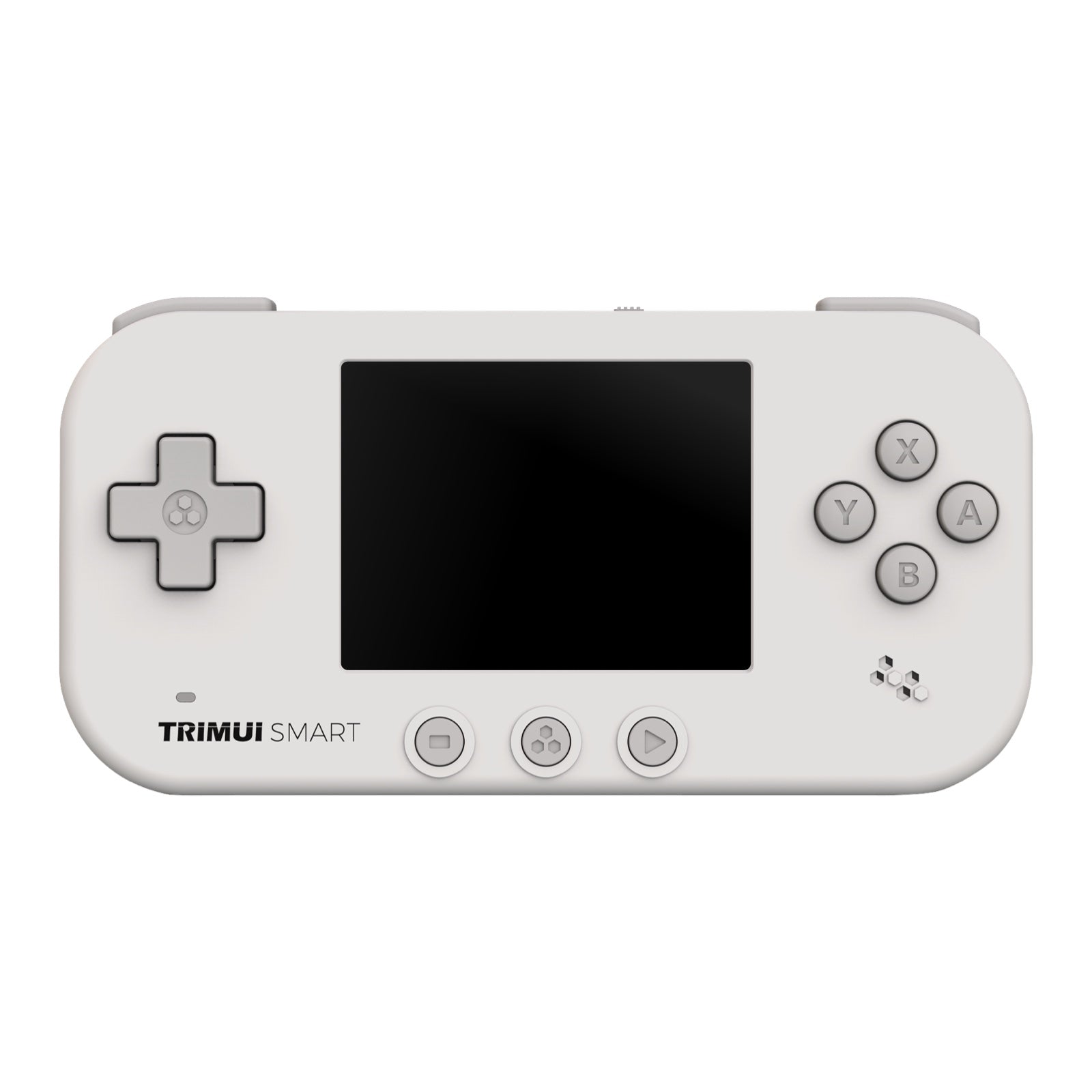
The TRIMUI Smart is a pocket-sized Linux emulation handheld that TRIMUI launched in 2022, before the company’s better-known Smart Pro line existed. It sits in a horizontal, tin-shaped shell roughly the size of an Altoids box and competes at the very bottom of the price ladder against the Miyoo Mini and Powkiddy’s cheapest models. This is not a machine you buy to push polygons; it is a 2.4-inch, 4:3 retro toy aimed squarely at 8-bit, 16-bit and early 32-bit libraries. Judge it on that basis and it makes sense. Expect anything more and it will let you down.
Emulation performance, generation by generation
The heart of the Smart is an Allwinner S3: a single-core Cortex-A7 clocked around 1.2 to 1.5 GHz with just 128 MB of LPDDR3 RAM. That is genuinely modest silicon — the S3 started life as a smart-camera chip, not a gaming part — and it sets a hard ceiling. NES, Game Boy, Game Boy Color, Master System, Genesis/Mega Drive and SNES all run at full speed through RetroArch cores, and Game Boy Advance is comfortable, which suits the GBA-style layout. PlayStation 1 is where the device runs out of road: many 2D and lighter 3D titles are playable, but heavier games bring frame skips and audio crackle, and the missing L2/R2 buttons break control schemes that need all four shoulders. Arcade support is uneven in the same way: the PC Engine, Neo Geo and lighter Final Burn Neo and CPS1/CPS2 sets play well, but anything CPU-heavy stutters. Nintendo DS is a stretch — a few titles boot but almost none are enjoyable, and the touchscreen games are a non-starter without a stylus digitiser — and everything above it (N64, Dreamcast, PSP, GameCube, PS2) is off the table. No firmware trick changes that; the chip simply is not there.
Screen, build and controls
The 2.4-inch IPS panel is 240 by 320 native (used at 320×240 in landscape) at 60 Hz, roughly 166 PPI. It is small but sharp for its size, colours read accurately, and the ten-step brightness slider goes low enough for night play and bright enough for a lit room. The body is soft-touch plastic in pastel colourways — yellow, teal, white, black — weighs about 100 grams and measures 110 x 58 x 15 mm, so it vanishes into a jacket pocket. Controls are the weak spot. You get a d-pad, ABXY face buttons and a single L and R on the top edge, plus a hardware power switch and three small circular buttons (Start, Select, menu) under the screen. There are no analog sticks, no L2/R2, and no dedicated volume buttons — volume lives on button combinations. The buttons are clicky and closely spaced, fine for platformers and RPGs, cramped for anyone with large hands.
Software and setup
Out of the box the Smart runs TRIMUI’s own Linux build (marketed as the “U1” platform), and it is the device’s worst feature: reviewers consistently report audio and video hitching every few seconds and a clumsy launcher. The fix is well established. This is one of the flagship supported devices for MinUI, Shaun Inman’s deliberately minimalist front end, which strips the interface back to clean scrollable game lists and makes the hardware feel far more coherent; RetroArch is reachable underneath for per-core tweaks. Be realistic about the wider custom-firmware scene, though. The big community distributions people name-drop — muOS, Knulli, ArkOS, ROCKNIX, Batocera — target more powerful Rockchip and Allwinner H700 boards, not the S3, so they do not run here. For the TRIMUI Smart the practical choice is stock or MinUI, and MinUI wins easily. Connectivity is Wi-Fi 4 and Bluetooth 4.0 (useful mostly for wireless headphones, since there is no 3.5 mm jack), plus a USB-C port for charging, 8 GB of internal eMMC and a microSD slot for your library. TRIMUI markets a wireless “battle” mode for local multiplayer, but treat that as a novelty rather than a reason to buy — the wider community effort went into MinUI, not the stock netplay.
Price, value and who it is for
The Smart launched around $56 and now turns up closer to $40-50 on AliExpress and Amazon, sometimes bundled with a pre-loaded card. Battery is the other compromise: a roughly 1,000-1,200 mAh cell that TRIMUI rates at 3.5 hours but that realistically delivers two to two-and-a-half hours of GBA play before the USB-C cable comes out. So who is it for? It is a cheap, genuinely pocketable second handheld for someone who wants Game Boy through SNES on a train and does not care about 3D. If your backlog is mostly PS1, or you want analog sticks, look elsewhere — a Miyoo Mini Plus or the newer TRIMUI Smart Pro will serve you better. As a sub-$50 curiosity that MinUI turns into a tidy little retro player, though, the Smart earns its keep.
📐 Size & Pocketability
⚖️ Weight vs Other Handhelds
🔋 Real-World Battery Estimator
⭐ Emulation Performance
📊 View How This Score is Calculated
The Hardware Power Score is an absolute metric. Perfect emulation of difficult, modern consoles awards significantly more points than standard retro consoles.
- 15× Multiplier: Modern PC
- 12× Multiplier: Switch, PS3, Xbox 360
- 10× Multiplier: Wii U
- 8× Multiplier: PS2, GameCube, Wii, Xbox
- 5× Multiplier: Saturn, Dreamcast, PSP
- 3× Multiplier: N64, PS1
- 1× Multiplier: SNES, GBA
Generation 5
Handhelds & Retro
📋 Full Specifications
📺 Display
⚙️ Platform
💾 Memory
🕹️ Controls
📏 Body
🔋 Battery
⚖️ Verdict
✅ The Good
- Genuinely pocketable: about 100 g in an Altoids-tin footprint that slips into any pocket
- Sharp, colour-accurate 2.4-inch IPS panel with a usable 10-step brightness range for the price
- One of MinUI's flagship devices, and that custom firmware transforms the sluggish stock OS
- Runs NES through SNES plus GBA at full speed and frequently sells for under $50
❌ The Bad
- Weak single-core Allwinner S3 caps it at PS1 (with frameskip); no N64, Dreamcast, PSP, or usable DS
- No analog sticks and no L2/R2 buttons, which breaks many PlayStation 1 control schemes
- Stuttery stock "U1" firmware, no headphone jack, and only about 2 to 2.5 hours of real-world battery
📰 Latest News & Guides
The Ultimate Guide to ARMSX3: Android’s New PS3 Emulator, Competitor Comparisons, and Setup Tutorial
18/08/2026Pokémon Gold, Silver, and Crystal (Gen 2) Recomp Lands on Android
17/08/2026How to Play the Pokémon Red, Blue, or Yellow Recomp on Your Android, Windows, and Linux Devices
16/08/2026🔍 Similar Handhelds
Other handhelds that emulate up to PS1.