
🛒 Where to Buy
⚠️ Golden Rule of Retro Handhelds: Throw away the cheap MicroSD card that comes in the box — it will fail. And never use a high-wattage PD “Fast Charger” on these devices; it can damage the battery. Use a standard 5V/1.5A brick.
Device Overview: Lenovo Legion Go
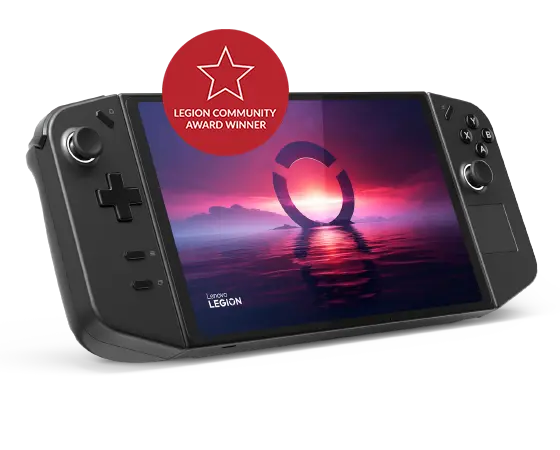
The Lenovo Legion Go is the handheld for people who looked at a Steam Deck and thought the screen was too small and the resolution too low. Its 8.8-inch panel is the largest on any mainstream Windows handheld, and the controllers slide off the sides Switch-style, including a right-hand pod that stands upright on a bundled puck and works as a vertical mouse. Inside is AMD’s Ryzen Z1 Extreme, the same chip in the original ROG Ally, so raw compute is a wash against Asus; what you are paying extra for is the bigger, sharper display and the detachable hardware. Against the Steam Deck the trade is blunt: the Legion Go pushes far more pixels and runs full Windows, but it is heavier, thirstier, and saddled with a desktop OS on a gamepad.
Emulation performance, generation by generation
The Z1 Extreme (8 Zen 4 cores, RDNA 3 graphics, configurable up to 30W here) is a strong emulation engine, and the 16GB of LPDDR5X-7500 keeps memory-hungry cores fed. PS2 (PCSX2), GameCube and Wii (Dolphin) are effortless at internal resolution multipliers that actually exploit the 1600p panel, so Wind Waker and God of War upscale cleanly instead of looking soft on a stretched screen. PSP via PPSSPP is trivial. Switch emulation on Ryujinx and the Yuzu forks is realistic for most of the library, though demanding first-party games still demand per-game tuning and tolerance for stutter. PS3 (RPCS3) and Wii U (Cemu) are genuinely playable but selective, leaning on the chip’s headroom and your patience with shader compilation. Xbox 360 (Xenia) remains rough and experimental, as it is on every handheld. The high-resolution screen is the real emulation perk: 2560×1600 gives you room to run 2x and 3x native resolution on older systems without external scaling artifacts.
Screen, build and controls
The 8.8-inch IPS panel is the headline: 2560×1600, 16:10, 144Hz, 500 nits. It is bright, dense, and big enough that text-heavy strategy and RPG menus stay legible. The controllers detach with a button press and the right one, dropped onto its included base, becomes an FPS mouse with a vertical grip and a scroll wheel, which is a real advantage for shooters that a thumbstick cannot match. A kickstand folds out of the back so you can dock the controllers and play tabletop. The cost is heft: 854g with controllers attached, well north of the Steam Deck OLED and ROG Ally, enough that long handheld sessions tire your wrists. The Hall-effect sticks resist drift. Battery is a 49.2Wh pack; expect roughly 1.5 hours flat-out and up to around 3 hours on lighter loads, which is ordinary for the class and worse than an OLED Deck sipping power.
Software and setup
This is Windows 11 Home, with all that implies. Lenovo Space (Legion Space) is the front-end launcher that aggregates your stores and exposes TDP, fan and resolution controls, and it is competent, but you are still one stray click away from the Windows desktop, a login prompt, or a driver pop-up mid-game. The “Windows tax” is real here: you manage updates, sleep behaves inconsistently compared to a Deck, and first-time setup means installing Steam, your launchers and emulators yourself rather than flipping into a curated mode. Power users will appreciate the openness; anyone wanting console-style pick-up-and-play will feel the friction.
Price, value and who it’s for
The original Legion Go launched at $699.99 for the 512GB Z1 Extreme model, with a 1TB version at $749.99 and a cheaper plain-Z1 configuration around $599.99. Pricing has swung wildly since, dipping to clearance levels well under $500 and, in some later restocks, climbing back near $999, so what you pay depends entirely on timing. At its launch price it asked a premium over the ROG Ally for the same chip, justified only if the larger 1600p screen and detachable controllers matter to you. They will matter most to emulation hobbyists who want resolution headroom, and to shooter players who want the mouse pod. If you mainly want efficient, frictionless portable gaming, a Steam Deck OLED is lighter, longer-lasting and simpler. The Legion Go is for the tinkerer who wants the biggest, sharpest Windows screen and accepts the weight and the OS to get it.
📐 Size & Pocketability
⚖️ Weight vs Other Handhelds
🔋 Real-World Battery Estimator
⭐ Emulation Performance
📊 View How This Score is Calculated
The Hardware Power Score is an absolute metric. Perfect emulation of difficult, modern consoles awards significantly more points than standard retro consoles.
- 15× Multiplier: Modern PC
- 12× Multiplier: Switch, PS3, Xbox 360
- 10× Multiplier: Wii U
- 8× Multiplier: PS2, GameCube, Wii, Xbox
- 5× Multiplier: Saturn, Dreamcast, PSP
- 3× Multiplier: N64, PS1
- 1× Multiplier: SNES, GBA
Gen 8 & PC
Generation 7
Generation 6
Generation 5
Handhelds & Retro
⚡ Performance Benchmarks
Where Lenovo Legion Go AMD Radeon 780M lands against the handhelds everyone knows. Every bar shares one scale, so longer genuinely means faster — add up to two rivals to compare.
CPU = Geekbench 6 multi-core · GPU = 3DMark Wild Life. Median real-world scores; every bar shares one scale — add up to two rivals to compare.
📋 Full Specifications
📺 Display
⚙️ Platform
💾 Memory
🕹️ Controls
📏 Body
🔋 Battery
⚖️ Verdict
✅ The Good
- Largest, sharpest screen in the class: 8.8-inch 2560×1600 IPS at 144Hz and 500 nits
- Detachable Switch-style controllers with a genuine FPS vertical-mouse mode and bundled base
- Z1 Extreme plus 16GB LPDDR5X handles PS2, GameCube, Wii and much of Switch with resolution headroom
- Built-in kickstand and Hall-effect sticks add real practical versatility
❌ The Bad
- Heavy at 854g with controllers, tiring for long handheld sessions
- Modest battery life (roughly 1.5 to 3 hours) from the 49.2Wh pack
- Full Windows 11 plus Legion Space means setup friction and the usual "Windows tax"
📰 Latest News & Guides
The Ultimate Guide to ARMSX3: Android’s New PS3 Emulator, Competitor Comparisons, and Setup Tutorial
18/08/2026Pokémon Gold, Silver, and Crystal (Gen 2) Recomp Lands on Android
17/08/2026How to Play the Pokémon Red, Blue, or Yellow Recomp on Your Android, Windows, and Linux Devices
16/08/2026🔍 Similar Handhelds
Other handhelds that emulate up to CURRENTGEN.