
🛒 Where to Buy
⚠️ Golden Rule of Retro Handhelds: Throw away the cheap MicroSD card that comes in the box — it will fail. And never use a high-wattage PD “Fast Charger” on these devices; it can damage the battery. Use a standard 5V/1.5A brick.
Device Overview: AYANEO Geek 1S
The AYANEO Geek 1S is the 2023 silicon refresh of AYANEO’s “value” line, a 7-inch Windows handheld built around AMD’s Ryzen 7 7840U (Zen 4 CPU, Radeon 780M graphics). It is worth being clear about what this device is up front: it is a full x86 PC, not a low-power ARM retro box like an Anbernic or a Miyoo. It shares its APU with the pricier AYA Neo 2S, but wraps it in a plainer chassis and a fingerprint power button, and it launched at $699 for the 16GB/512GB configuration. Its real rivals are the Steam Deck OLED, the ASUS ROG Ally and the Lenovo Legion Go, not the sub-$100 emulation crowd.
Emulation performance, generation by generation
Because this runs desktop Windows on a Radeon 780M, its emulation ceiling is among the highest you can hold in two hands. Everything up to the sixth console generation is trivial: RetroArch cores for the NES through the PlayStation, N64, Dreamcast and PSP run at full speed with power to spare, so you can chase 3x-4x internal resolution or shader stacks without dropping frames. GameCube and Wii through Dolphin are comfortable at 2x-3x native. PS2 via PCSX2 is where a weaker handheld would start sweating; the 7840U handles the bulk of the library at 3x with the Vulkan renderer. The harder tiers are the honest test. Wii U through Cemu is strong, with Breath of the Wild holding a playable 30-40fps once you dial in the settings. Switch emulation now means Ryujinx forks rather than the discontinued yuzu, and the 780M can push many titles to or near full speed, though the heaviest games (Tears of the Kingdom) demand per-game tuning and eat both battery and thermal headroom. PS3 through RPCS3 is the practical top of the mountain: the Vulkan backend works, but demanding titles turn choppy, and this is a chip running at 15-28W in a handheld, not a desktop GPU. Xbox 360 via Xenia remains experimental and title-dependent. In short, the ceiling is real but it is a tuning hobby up top, not a one-tap experience.
Screen, build and controls
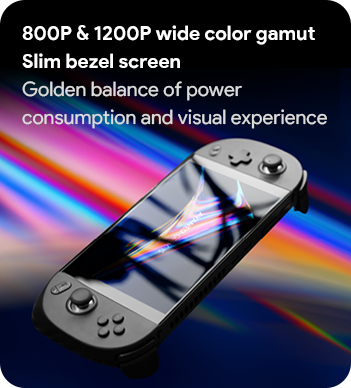
The panel is a 7-inch 16:10 IPS touchscreen, offered as either 1280×800 or the sharper 1920×1200 (323 PPI) version, at 60Hz and roughly 500 nits. It is a good LCD, but it is an LCD: there is no OLED contrast and no variable refresh, which is precisely where the Steam Deck OLED walks past it. Build quality is solid and the ergonomics earn their reputation for long sessions, but at 672g this is a heavy slab, noticeably more than a Deck, and the fan is genuinely loud, spiking toward 67 dB under a full load. The controls are the strong suit: Hall effect analog sticks and Hall effect analog triggers mean no stick drift and no mushy trigger creep, backed by stacked L1/R1 and L2/R2 bumpers, a bottom-mounted d-pad, four programmable buttons and a fingerprint reader baked into the power button.
Software and setup
It ships with Windows 11 Home 64-bit, and AYANEO’s own AYA Space launcher is the weak link, a cluttered utility that has improved but still gets in the way. One thing to set expectations on: the ARM custom-firmware ecosystem that defines cheaper handhelds, muOS, Knulli, ArkOS, ROCKNIX and OnionOS, does not apply here at all, because none of it targets x86. What you do instead is either lean on Windows directly, run EmuDeck on Windows to auto-configure your emulators and a front end, or wipe the drive for a Linux console experience such as Batocera or Bazzite for a SteamOS-style couch interface. The dual USB4/Thunderbolt ports also open the door to an external GPU or a dock, alongside a microSD reader and a 3.5mm jack, so this doubles as a small desktop when plugged in.
Price, value and who it is for
At $699 for 16GB/512GB (with 32GB/2TB variants climbing well past that), the Geek 1S is not the value pick it once was. The Steam Deck OLED undercuts it at $549 with a better screen and a far more polished software stack, and you are paying the AYANEO premium for the higher-resolution panel, Hall effect inputs and the open flexibility of Windows plus Thunderbolt. This is the handheld for someone who specifically wants Windows, Game Pass and a native Steam library in one shell, and who treats emulation up through Switch and PS3 as a project to be tuned rather than a menu to be tapped. If you want the cleanest out-of-box experience, buy a Deck; if you want the raw ceiling and will do the setup work, the Geek 1S delivers it.
📐 Size & Pocketability
⚖️ Weight vs Other Handhelds
🔋 Real-World Battery Estimator
⭐ Emulation Performance
📊 View How This Score is Calculated
The Hardware Power Score is an absolute metric. Perfect emulation of difficult, modern consoles awards significantly more points than standard retro consoles.
- 15× Multiplier: Modern PC
- 12× Multiplier: Switch, PS3, Xbox 360
- 10× Multiplier: Wii U
- 8× Multiplier: PS2, GameCube, Wii, Xbox
- 5× Multiplier: Saturn, Dreamcast, PSP
- 3× Multiplier: N64, PS1
- 1× Multiplier: SNES, GBA
Gen 8 & PC
Generation 7
Generation 6
Generation 5
Handhelds & Retro
⚡ Performance Benchmarks
Where AYANEO Geek 1S AMD Radeon 780M lands against the handhelds everyone knows. Every bar shares one scale, so longer genuinely means faster — add up to two rivals to compare.
CPU = Geekbench 6 multi-core · GPU = 3DMark Wild Life. Median real-world scores; every bar shares one scale — add up to two rivals to compare.
📋 Full Specifications
📺 Display
⚙️ Platform
💾 Memory
🕹️ Controls
📏 Body
🔋 Battery
⚖️ Verdict
✅ The Good
- Ryzen 7 7840U / Radeon 780M pushes emulation up through Switch, Wii U and (with tuning) PS3
- Sharp 1920×1200 7-inch IPS option at 323 PPI, brighter than many rivals
- Hall effect sticks and Hall effect analog triggers eliminate drift and trigger creep
- Full Windows 11 plus dual USB4/Thunderbolt for docking, eGPU and a native Steam/Game Pass library
❌ The Bad
- Heavy at 672g and the fan gets loud (up to ~67 dB) under load
- IPS 60Hz panel with no OLED contrast or VRR, and priced above the Steam Deck OLED
- AYA Space launcher is clunky and PS3/demanding Switch titles need per-game tuning, not one-tap play
📰 Latest News & Guides
The Ultimate Guide to ARMSX3: Android’s New PS3 Emulator, Competitor Comparisons, and Setup Tutorial
18/08/2026Pokémon Gold, Silver, and Crystal (Gen 2) Recomp Lands on Android
17/08/2026How to Play the Pokémon Red, Blue, or Yellow Recomp on Your Android, Windows, and Linux Devices
16/08/2026🔍 Similar Handhelds
Other handhelds that emulate up to CURRENTGEN.