
🛒 Where to Buy
⚠️ Golden Rule of Retro Handhelds: Throw away the cheap MicroSD card that comes in the box — it will fail. And never use a high-wattage PD “Fast Charger” on these devices; it can damage the battery. Use a standard 5V/1.5A brick.
Device Overview: Lenovo Legion Go S
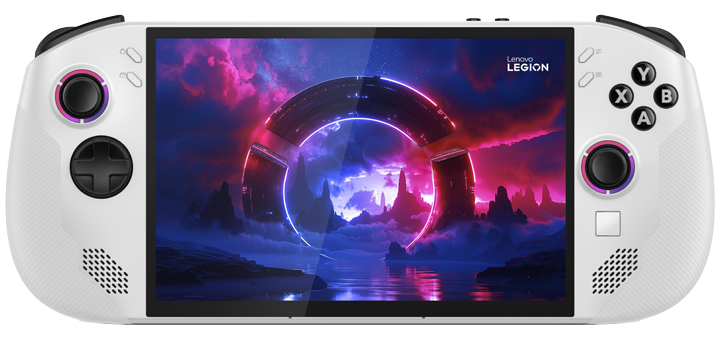
The Legion Go S is the smaller sibling that fixes the original Legion Go’s biggest sin: it bolts the controllers down. Where the first Legion Go gave you detachable Joy-Con-style halves and a kickstand, the Go S is a single unibody slab with permanently attached grips. That sounds like a downgrade and isn’t. The fixed shell lets Lenovo round out fuller hand grips, and the result is one of the more comfortable 8-inch handhelds you can hold for two hours straight. The screen drops from the original’s 8.8-inch 1600p panel to an 8-inch, 1920×1200, 120Hz IPS display. Lower resolution on a smaller chassis is the right call here, because none of the chips inside want to push 1600p anyway.
The headline isn’t the hardware, it’s the OS. The Go S is the first handheld outside Valve to ship with SteamOS officially licensed and pre-installed. That makes it the most direct Steam Deck OLED alternative ever built: same operating system, bigger and faster (if non-OLED) screen, a more current chip option, and a microSD slot plus user-accessible M.2 SSD. Against the ROG Ally X, which is locked to Windows 11, the SteamOS Go S boots straight into a controller-native interface with no taskbar to fight. Lenovo sells it two ways, and the split is real: a Nebula Violet SteamOS edition and a Glacier White Windows 11 edition, with different chips and very different out-of-box experiences.
Emulation performance, generation by generation
Be honest about the silicon tier. The cheapest unit runs a Ryzen Z2 A, a Zen 2-class part that is the weakest APU here; the volume seller uses the Ryzen Z2 Go (Zen 3+ CPU, RDNA 2 graphics, 4 cores); the top model carries the Ryzen Z1 Extreme (Zen 4, RDNA 3, Radeon 780M) – the same chip from the first Legion Go and ROG Ally X. Emulation scales accordingly.
Everything up to PS1, N64, Dreamcast and PSP is a non-issue on all three; DuckStation, Mupen64Plus, Flycast and PPSSPP run full speed even on the Z2 A. GameCube and Wii through Dolphin are comfortable on the Z2 Go and Z1 Extreme, with most first-party games holding 60fps at 2-3x internal resolution; the Z2 A handles them at native or 1.5x. PS2 via PCSX2 is solid on the Z2 Go and excellent on the Z1 Extreme. The Switch (Ryujinx) is where the tier line bites: the Z1 Extreme is the only configuration I’d buy for it, and even then expect to tune per game. PS3 (RPCS3) is playable but spiky and strictly a Z1 Extreme proposition. On SteamOS, EmuDeck installs the whole RetroArch-plus-standalone stack in one pass, which is the single best reason to favor the Steam edition for emulation.
Screen, build and controls
The 8-inch 1920×1200 120Hz IPS panel is bright and sharp, with variable refresh. It is not OLED, so blacks are gray next to a Steam Deck OLED, and you give up that contrast for resolution and size. The build is the strong part: 55.5Wh battery, roughly 730g, full-size offset thumbsticks with RGB rings, an 8-way D-pad that is a genuine upgrade over the original’s mushy one, Hall-effect analog triggers, and a small touchpad. The grips are deep enough that the weight disappears in use. There is a rear-accessible 2280 M.2 slot and a microSD reader, so storage is yours to expand.
Software and setup
This is the real fork in the road. The SteamOS edition (Nebula Violet) boots into Valve’s interface, suspends and resumes games instantly, sleeps for days, and needs zero configuration to feel like a console. The Windows 11 editions (Glacier White) ship with Lenovo’s Legion Space launcher over a desktop OS that was never built for a 7-to-8-inch touchscreen: tiny targets, sleep states that occasionally drain the battery overnight, and driver updates you manage yourself. Windows buys you Game Pass, anti-cheat compatibility and any non-Steam launcher. If you live in Steam, the SteamOS unit is the one to get; the same Z1 Extreme silicon measurably outperforms the Windows build because SteamOS leaves more wattage and memory for the game.
Price, value and who it’s for
Lenovo announced a $499.99 entry point at CES 2025 for the Z2 A SteamOS model, with the Z2 Go around the $600-650 mark and the Z1 Extreme SteamOS unit near $830 at launch. Memory-cost-driven price hikes have since pushed several configurations well above those figures, so check current pricing before committing. The value pick is the Z2 Go SteamOS model: enough chip for everything short of Switch and PS3 emulation, the good OS, and the comfortable shell. Avoid the cheapest Z2 A unless your library is indies and retro. Buy this if you want a Steam Deck OLED rival with a bigger, faster screen and a real SSD slot, and you don’t need detachable controllers – the original Legion Go or the Legion Go 2 are where those live.
📐 Size & Pocketability
⚖️ Weight vs Other Handhelds
🔋 Real-World Battery Estimator
⭐ Emulation Performance
📊 View How This Score is Calculated
The Hardware Power Score is an absolute metric. Perfect emulation of difficult, modern consoles awards significantly more points than standard retro consoles.
- 15× Multiplier: Modern PC
- 12× Multiplier: Switch, PS3, Xbox 360
- 10× Multiplier: Wii U
- 8× Multiplier: PS2, GameCube, Wii, Xbox
- 5× Multiplier: Saturn, Dreamcast, PSP
- 3× Multiplier: N64, PS1
- 1× Multiplier: SNES, GBA
Gen 8 & PC
Generation 7
Generation 6
Generation 5
Handhelds & Retro
⚡ Performance Benchmarks
Where Lenovo Legion Go S AMD Radeon 680M lands against the handhelds everyone knows. Every bar shares one scale, so longer genuinely means faster — add up to two rivals to compare.
CPU = Geekbench 6 multi-core · GPU = 3DMark Wild Life. Median real-world scores; every bar shares one scale — add up to two rivals to compare.
📋 Full Specifications
📺 Display
⚙️ Platform
💾 Memory
🕹️ Controls
📏 Body
🔋 Battery
⚖️ Verdict
✅ The Good
- First officially licensed non-Valve SteamOS handheld – console-grade boot, suspend and sleep with zero setup
- Comfortable fixed-grip unibody shell with an 8-way D-pad and Hall-effect triggers that beat the original Legion Go's controls
- Bright 8-inch 1920×1200 120Hz IPS screen with VRR, larger than the Steam Deck OLED's panel
- User-upgradeable M.2 2280 SSD plus microSD slot, so storage isn't locked at purchase
❌ The Bad
- IPS panel means gray blacks and weaker contrast next to a Steam Deck OLED
- Three-way APU split is confusing, and the cheapest Z2 A is too weak for Switch, PS3 or demanding modern games
- The Windows 11 editions inherit every small-touchscreen and sleep-drain headache Windows has on a handheld
📰 Latest News & Guides
The Ultimate Guide to ARMSX3: Android’s New PS3 Emulator, Competitor Comparisons, and Setup Tutorial
18/08/2026Pokémon Gold, Silver, and Crystal (Gen 2) Recomp Lands on Android
17/08/2026How to Play the Pokémon Red, Blue, or Yellow Recomp on Your Android, Windows, and Linux Devices
16/08/2026🔍 Similar Handhelds
Other handhelds that emulate up to CURRENTGEN.