
🛒 Where to Buy
⚠️ Golden Rule of Retro Handhelds: Throw away the cheap MicroSD card that comes in the box — it will fail. And never use a high-wattage PD “Fast Charger” on these devices; it can damage the battery. Use a standard 5V/1.5A brick.
Device Overview: Serious Play Digi Dock 2
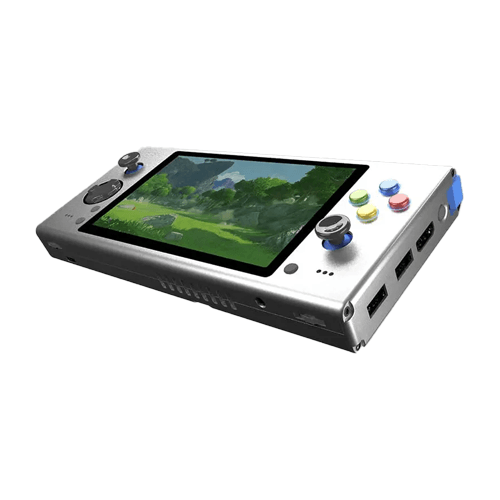
The Digi Dock 2 is not a handheld in the usual sense. It is an empty shell you finish yourself. Sold by the small, near-anonymous Chinese maker Serious Play — also stamped N+ — through the My Retro Game Case store, it is a “docking station”: a 5.5-inch screen, a gamepad, a large battery, HDMI out and a couple of USB ports, into which you install your own computer. That computer can be a Raspberry Pi, an Android TV stick, or an Intel compute stick, and you can even buy the shell with no brains at all. RetroDodo once called the original Digi Dock “the most mysterious console to come out of China,” and the sequel keeps that reputation: documentation is thin, published specs contradict each other, and the person behind it barely surfaces online. Buy this only if assembling and flashing your own portable sounds like the fun part.
Emulation performance, generation by generation
There is no single answer here, because the Digi Dock has no fixed chip — its ceiling is whatever module you slot in. With the most common choice, a Raspberry Pi 4 running RetroPie, Lakka or Batocera, you get flawless 8- and 16-bit consoles, near-perfect PlayStation 1 through DuckStation or PCSX-ReARMed, and solid arcade and Game Boy Advance. N64, Dreamcast and PSP are the ragged edge: some titles run, many stutter, and you will spend time tuning per game. An older Pi 3 drops PS1 to “mostly fine” and abandons the fifth generation. Swap in an Android TV stick and the ceiling moves with the stick’s SoC — a weak one caps out around PSP in RetroArch, a strong one can attempt GameCube in Dolphin or PS2 in a NetherSX2 fork. Put a genuine x86 stick or mini-PC board inside and Windows opens PCSX2 and Dolphin properly, so GameCube, Wii and PS2 become realistic, plus light native PC games. The catch is that the cheap Intel Atom and Celeron sticks these shells were built around are underpowered, so treat sixth-generation emulation as “possible on the right module,” not a promise of the platform.
Screen, build and controls
The V2 revision moved to a 5.5-inch IPS panel — up from 5 inches on the original — with a 16:9 capacitive touchscreen that registers up to five points, handy for Android and desktop menus. Actual resolution follows your module’s output, typically 720p or 1080p over the internal HDMI link. The body is aluminium, roughly 206 x 100 x 38 mm, in a wide horizontal layout, and the roughly 10,000 mAh battery is genuinely oversized: it doubles as a QC3.0 power bank for your phone. Controls are conventional — twin analog sticks, a d-pad, ABXY, L/R shoulders, and volume, brightness, power and a screen-toggle button — with two USB 2.0 ports for external pads or a keyboard. I would not trust the aggregator claims of Hall-effect sticks or a gyroscope; nothing from the maker confirms them, so assume ordinary potentiometer sticks until proven otherwise.
Software and setup
There is no stock firmware to speak of, and that is the whole point. You flash the operating system onto whatever module you installed. On a Raspberry Pi that means Raspberry Pi OS with RetroPie, or a turnkey image such as Batocera or Lakka. On an x86 stick it means full Windows with EmuDeck, RetroBat or LaunchBox laid on top, or Batocera again. On an Android stick you run a launcher like Daijisho or Dig over RetroArch. Note that the polished custom-firmware scene built for dedicated handhelds — muOS, Knulli, ArkOS, ROCKNIX, OnionOS — does not apply here, because those images are compiled for specific Allwinner and Rockchip boards, not a bring-your-own-computer dock. You are doing PC-style setup: imaging an SD card, wiring the shell’s controls, and mapping buttons yourself. Expect an afternoon of work before the first game boots.
Price, value and who it is for
Pricing is the murkiest part. Because you are buying a shell plus an optional core, the total swings with your configuration, and the maker sold it in short pre-order windows rather than at a steady retail price. Third-party listings peg a mid-range build near $300, but treat that as an estimate, not a quote — and remember a Raspberry Pi and a fast SD card sit on top. The Digi Dock 2 arrived in January 2022 into a market where Anbernic, Powkiddy and Retroid already sold finished handhelds that boot in seconds for less money. That makes it a poor value for anyone who just wants to play. It only makes sense for tinkerers who already own a spare Pi or compute stick, who want one chassis that can host different brains, and who see the assembly as the hobby. For everyone else, a ready-made device is the smarter buy.
📐 Size & Pocketability
🔋 Real-World Battery Estimator
⭐ Emulation Performance
📊 View How This Score is Calculated
The Hardware Power Score is an absolute metric. Perfect emulation of difficult, modern consoles awards significantly more points than standard retro consoles.
- 15× Multiplier: Modern PC
- 12× Multiplier: Switch, PS3, Xbox 360
- 10× Multiplier: Wii U
- 8× Multiplier: PS2, GameCube, Wii, Xbox
- 5× Multiplier: Saturn, Dreamcast, PSP
- 3× Multiplier: N64, PS1
- 1× Multiplier: SNES, GBA
Gen 8 & PC
Generation 7
Generation 6
Generation 5
Handhelds & Retro
📋 Full Specifications
📺 Display
⚙️ Platform
💾 Memory
🕹️ Controls
📏 Body
🔋 Battery
⚖️ Verdict
✅ The Good
- One chassis hosts different brains — a Raspberry Pi, an Android TV stick or an x86 compute stick — so you are not locked to a single SoC.
- The roughly 10,000 mAh battery is enormous for a handheld and doubles as a QC3.0 power bank for other devices.
- The 5.5-inch IPS screen with five-point capacitive touch and HDMI-out to a TV make it usable as a full Android or desktop device, not just an emulator box.
- With an x86 module and Windows, PS2, GameCube and Wii emulation through PCSX2 and Dolphin, plus light native PC games, is genuinely on the table.
❌ The Bad
- It ships as an empty shell: you supply the compute module, flash the OS and wire the controls, so there is no plug-and-play experience.
- Sourcing is thin and contradictory and the maker is nearly anonymous, so specs, support and spare parts are hard to verify or obtain.
- Value is poor versus finished 2022 handhelds from Anbernic, Powkiddy or Retroid once you add a Raspberry Pi and an SD card.
📰 Latest News & Guides
The Ultimate Guide to ARMSX3: Android’s New PS3 Emulator, Competitor Comparisons, and Setup Tutorial
18/08/2026Pokémon Gold, Silver, and Crystal (Gen 2) Recomp Lands on Android
17/08/2026How to Play the Pokémon Red, Blue, or Yellow Recomp on Your Android, Windows, and Linux Devices
16/08/2026🔍 Similar Handhelds
Other handhelds that emulate up to Saturn.