
🛒 Where to Buy
⚠️ Golden Rule of Retro Handhelds: Throw away the cheap MicroSD card that comes in the box — it will fail. And never use a high-wattage PD “Fast Charger” on these devices; it can damage the battery. Use a standard 5V/1.5A brick.
Device Overview: ClockworkPi GameShell
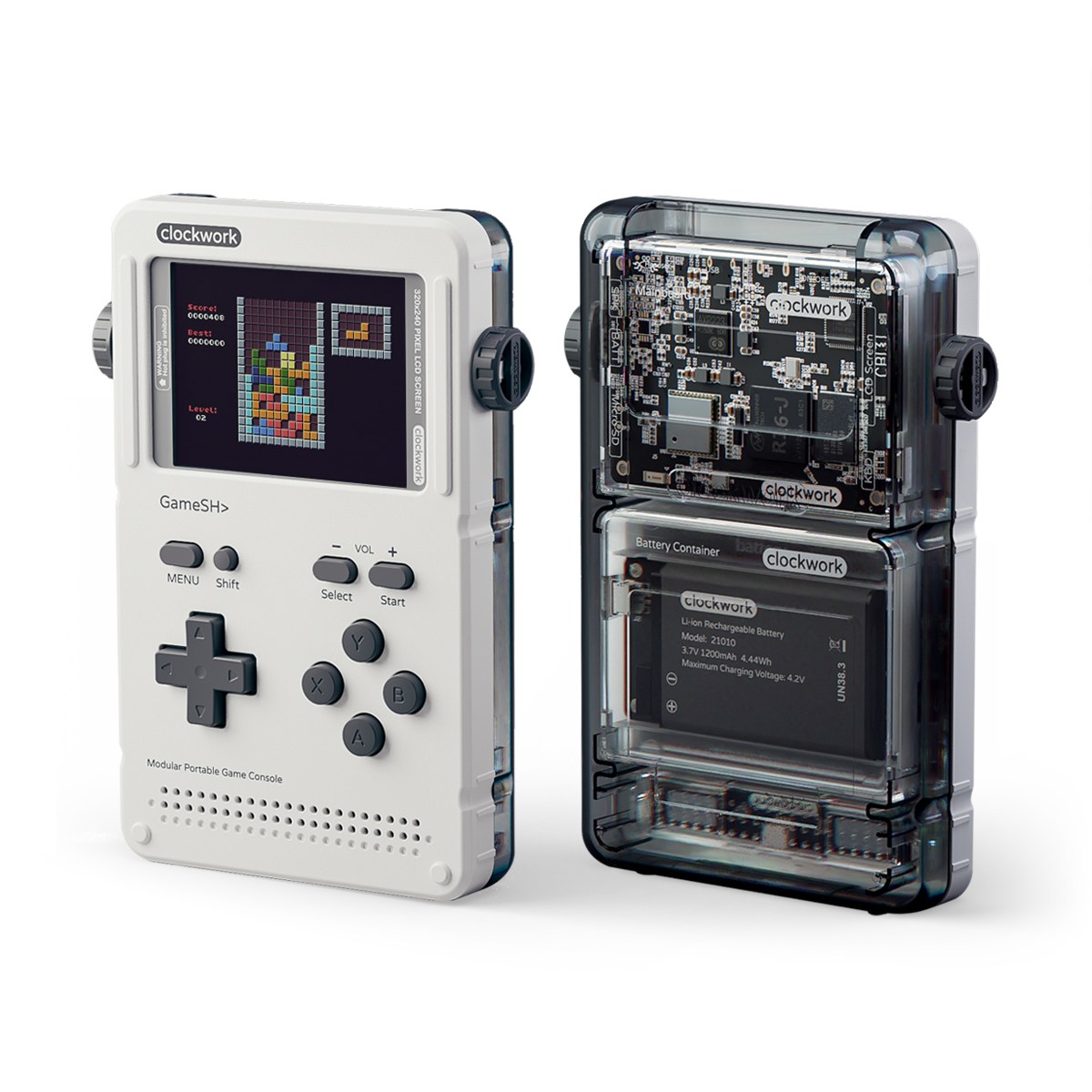
The GameShell is not really a games console you buy. It’s a console you assemble. ClockworkPi ships it as a flat-pack kit of snap-together modules and a bag of plastic shells, and the first thing you do with it is spend forty-five minutes clicking it together on your kitchen table. That single fact tells you almost everything about who this device is for. An Anbernic RG35XX or a Miyoo Mini arrives charged, loaded, and ready to play before you’ve found the charging cable. The GameShell arrives as a project. If that sentence makes you groan, stop reading and buy the Miyoo. If it makes you reach for a screwdriver you don’t even need (it builds without tools), keep going.
At its core sits an Allwinner R16-J: a quad-core ARM Cortex-A7 clocked up to 1GHz, paired with a Mali-400 MP2 GPU and 1GB of DDR3 RAM. That is an SoC from the mid-2010s tablet bin, and it shows. The 2.7-inch TFT panel runs 320×240 in a 4:3 aspect, a 1200mAh battery feeds it for roughly three hours of real play, and a 32GB microSD holds the OS and your ROMs. These are honest, modest numbers. Anyone selling you the GameShell on horsepower is selling you the wrong thing.
Emulation performance, generation by generation
Set expectations at 8- and 16-bit and you’ll be happy. NES, Game Boy, Game Boy Color, Master System, Genesis/Mega Drive, and PC Engine all run full speed with room to spare, and the 320×240 panel is a genuinely good match for pixel art from that era. SNES is comfortable on the standard cores. Game Boy Advance is the headline the device can actually deliver on: reviewers ran Pokémon Emerald through the bundled mGBA core and reported it smooth and stable, and that holds for most of the GBA library.
The ceiling arrives at PlayStation. PS1 is “light” territory, not a promise. 2D and simpler 3D titles are playable; anything demanding will need frameskip, overclock tweaks, or a lowered internal resolution, and plenty of games will fight you. N64, Dreamcast, and PSP are off the table in any serious sense. The Cortex-A7 simply does not have the single-thread grunt, and no amount of community tuning changes the silicon. The bundled stack is a sensible set of standalone emulators (mGBA, Nestopia, MAME, a PCSX build) plus RetroArch for everything else. You don’t buy a GameShell to push frames. You buy it to play the libraries it was always going to run, and to enjoy doing it on hardware you built.
Build, modularity and controls
This is the part that justifies the device. The GameShell is genuinely modular: a mainboard, a separate screen module, a programmable keypad board driven by an ATmega168P microcontroller, a stereo speaker module, and the battery, each in its own snap-fit case and each swappable. The keypad exposes Arduino-compatible GPIO and a USB port, so it’s a tinkering surface, not just a D-pad. The Lightkey module adds five extra mappable keys along the bottom edge, the most common reason people open the case back up after the first build.
The controls are the honest weak point. The face and D-pad inputs are membrane-style and mushy, closer to a TV remote than a clicky console pad, and the swappable-keypad design is partly an admission of that, the community has built mechanical replacements. The 320×240 screen is small and low-res by any 2024 standard, but it’s sharp and the colors are clean. Nothing here feels premium. Everything here feels like it wants you to take it apart, and that is the entire point.
Software and the open-source community
ClockworkOS, the stock software, is Debian-based on a Linux 4.1x kernel, fronted by a tile launcher. Because it’s real Debian under glass, the GameShell is a tiny Linux computer first and an emulator second. You get a terminal, package management, WiFi and Bluetooth, micro-HDMI out, and Python on board, which is exactly why it became a teaching and hacking toy. People run PICO-8 on it, write their own launcher tiles, script the hardware buttons, and push the whole thing to GitHub. The hardware design files are open too. Community OS images and forks exist for those who outgrow the stock launcher. This is the layer where the device earns its keep: not in benchmarks, but in how far you can pry it open.
Price, value and who it’s for
The kit lists at $165 and has sold around $135 on sale. Judged purely on specs-per-dollar, that’s a bad deal. A sub-$60 Miyoo or Anbernic outguns it on screen, battery, controls, and out-of-box convenience, and it isn’t close. The GameShell’s price buys an experience: the build, the open hardware, the GPIO header, the Linux shell, the soldering-iron community around it. Buy it if you are a maker, an educator, a Python tinkerer, or someone who genuinely wants to assemble and hack the thing you play on. Do not buy it if you want to put a card in and play SNES on the couch tonight, the battery and the mushy buttons will annoy you, and you’ll have paid triple for the privilege. Right tool, very specific job.
📺 Device in Action
📐 Size & Pocketability
🔋 Real-World Battery Estimator
⭐ Emulation Performance
📊 View How This Score is Calculated
The Hardware Power Score is an absolute metric. Perfect emulation of difficult, modern consoles awards significantly more points than standard retro consoles.
- 15× Multiplier: Modern PC
- 12× Multiplier: Switch, PS3, Xbox 360
- 10× Multiplier: Wii U
- 8× Multiplier: PS2, GameCube, Wii, Xbox
- 5× Multiplier: Saturn, Dreamcast, PSP
- 3× Multiplier: N64, PS1
- 1× Multiplier: SNES, GBA
Generation 6
Generation 5
Handhelds & Retro
📋 Full Specifications
📺 Display
⚙️ Platform
💾 Memory
🕹️ Controls
📏 Body
🔋 Battery
⚖️ Verdict
✅ The Good
- Genuinely modular, tool-free assembly with swappable, individually-cased boards (mainboard, screen, keypad, speaker, battery)
- Open-source hardware plus a real Debian/Linux OS with Python, terminal, GPIO and WiFi/Bluetooth for serious hacking
- Solid 8/16-bit and GBA emulation, with a 320×240 panel well-suited to pixel art
- Active maker community: PICO-8, custom launchers, mechanical-keypad mods, alternative OS images
❌ The Bad
- Mushy membrane-style face and D-pad buttons that feel cheap next to any modern handheld
- Weak SoC ceiling: PS1 is hit-or-miss and N64/Dreamcast/PSP are out, with no fix in software
- Poor value on paper at ~$135-165, roughly three hours of battery, and slow charging versus sub-$60 rivals
📰 Latest News & Guides
The Ultimate Guide to ARMSX3: Android’s New PS3 Emulator, Competitor Comparisons, and Setup Tutorial
18/08/2026Pokémon Gold, Silver, and Crystal (Gen 2) Recomp Lands on Android
17/08/2026How to Play the Pokémon Red, Blue, or Yellow Recomp on Your Android, Windows, and Linux Devices
16/08/2026🔍 Similar Handhelds
Other handhelds that emulate up to PSP.